> ## Documentation Index
> Fetch the complete documentation index at: https://help.broadstripes.com/llms.txt
> Use this file to discover all available pages before exploring further.
# Bouncing emails
> Find and re-enable BCC recipients on your public forms that email providers are rejecting
## Overview
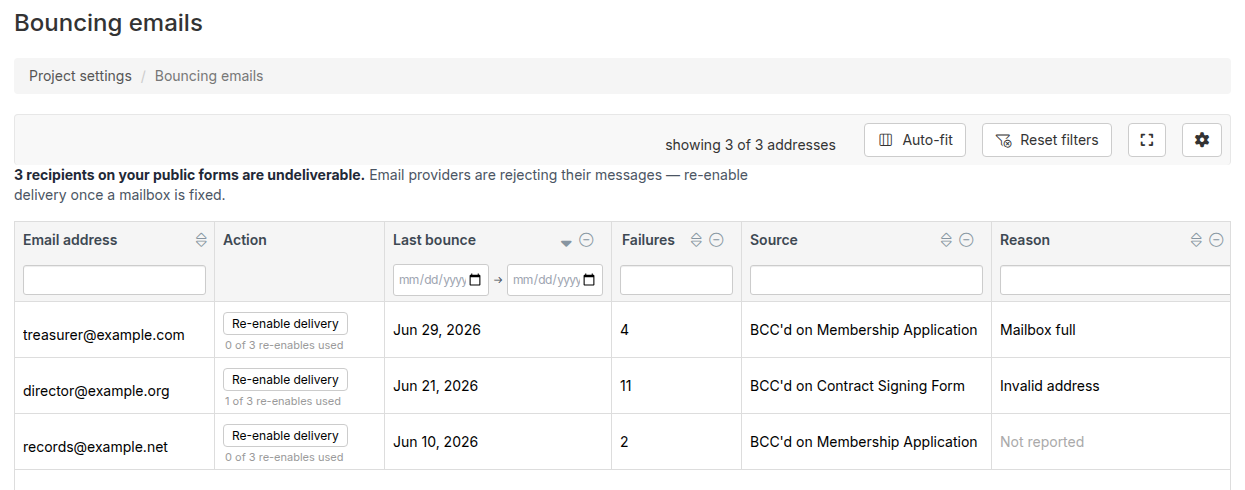
The Bouncing emails page shows every email address that is currently undeliverable on your project's public forms. When an address you've added to a form's "Other recipients" (BCC) list starts bouncing -- meaning the email provider is rejecting messages to it -- Broadstripes records it here and stops sending to that address until you clear the suppression.
Use this page to see which addresses are affected, understand why they're bouncing, and re-enable delivery once the mailbox issue is fixed.
## Accessing the Bouncing emails page
1. Click **Settings** in the upper right corner of any page.
2. Type "Bouncing" in the filter box, then click **Bouncing emails**.
The page lists all BCC addresses on your project's public forms that are currently blocked. If no addresses are blocked, the table is empty.
 ## Understanding the table
Each row represents one blocked email address. The table includes the following columns:
| Column | Description |
| ----------------- | --------------------------------------------------------------------------------------------------------------------------------- |
| **Email address** | The blocked address. |
| **Action** | A **Re-enable delivery** button, plus a counter showing how many re-enable attempts have been used. |
| **Last bounce** | When the most recent delivery failure was recorded. |
| **Failures** | Total number of delivery failures recorded for this address. |
| **Source** | Which public form (or forms) has this address in its "Other recipients" list. Each source links directly to that form's settings. |
| **Reason** | The reason code reported by the email provider, if available. |
The table supports sorting and filtering on all columns. Use the **Source** filter to find all bouncing addresses related to a specific form.
## Re-enabling delivery
When a mailbox is fixed -- the address is corrected, the inbox is no longer full, or the provider has cleared its block -- you can ask Broadstripes to remove the suppression:
1. Find the address in the table.
2. Click **Re-enable delivery** in the Action column.
3. Confirm the action in the dialog that appears.
Broadstripes submits a job to clear the address from the email provider's suppression list. The button changes to **Re-enable requested** while the job runs. No email is sent at this point -- once the suppression clears, future public form submissions will resume delivering to that address.
Re-enabling delivery does not guarantee future messages will be accepted. If the underlying mailbox problem is not resolved, the address may bounce again and re-enter the suppression list.
### Re-enable limit
Each address has a limit on how many times delivery can be re-enabled. The Action column shows the current count (for example, "1 of 3 re-enables used"). When the limit is reached:
* **Regular users** see the button disabled. The counter shows "Max re-enables used" and a warning icon appears. Consider correcting or removing the address from the form's "Other recipients" field.
* **Project group admins** can re-enable past the limit, but a warning tooltip notes that the address may be permanently undeliverable. Use judgment before re-enabling repeatedly.
## Fixing the underlying problem
Re-enabling delivery clears the suppression, but the address may bounce again if the root cause is not resolved. Common causes and fixes:
* **Invalid address**: Correct the address in the form's Confirmation email tab > "Other recipients" field.
* **Full mailbox**: Ask the recipient to clear space, then re-enable.
* **Domain not found**: The domain no longer exists or was misspelled -- correct the address.
* **Spam block**: The recipient's mail server blocked Broadstripes as spam -- contact Broadstripes Support if this persists.
To update an address in a form, click the form name in the **Source** column to go directly to that form's settings.
## Relationship to the per-form Email tab
The Bouncing emails page is an aggregated view across all forms in the project. Each individual public form's **Confirmation email tab** also shows its own bouncing "Other recipients" addresses -- you can re-enable delivery from there too. Use whichever view is more convenient:
* Use the **Bouncing emails page** to see all blocked addresses across all forms at once.
* Use the **Confirmation email tab** to see and fix issues while editing a specific form.
## Next Steps
* [Confirmation email tab](./email-tab) -- Configure "Other recipients" and other email settings for a public form.
* [Public forms overview](./public-forms-overview) -- Learn how public forms work.
* [Viewing and downloading public forms](./viewing-and-downloading-public-forms) -- See and download submitted form PDFs.
## Understanding the table
Each row represents one blocked email address. The table includes the following columns:
| Column | Description |
| ----------------- | --------------------------------------------------------------------------------------------------------------------------------- |
| **Email address** | The blocked address. |
| **Action** | A **Re-enable delivery** button, plus a counter showing how many re-enable attempts have been used. |
| **Last bounce** | When the most recent delivery failure was recorded. |
| **Failures** | Total number of delivery failures recorded for this address. |
| **Source** | Which public form (or forms) has this address in its "Other recipients" list. Each source links directly to that form's settings. |
| **Reason** | The reason code reported by the email provider, if available. |
The table supports sorting and filtering on all columns. Use the **Source** filter to find all bouncing addresses related to a specific form.
## Re-enabling delivery
When a mailbox is fixed -- the address is corrected, the inbox is no longer full, or the provider has cleared its block -- you can ask Broadstripes to remove the suppression:
1. Find the address in the table.
2. Click **Re-enable delivery** in the Action column.
3. Confirm the action in the dialog that appears.
Broadstripes submits a job to clear the address from the email provider's suppression list. The button changes to **Re-enable requested** while the job runs. No email is sent at this point -- once the suppression clears, future public form submissions will resume delivering to that address.
Re-enabling delivery does not guarantee future messages will be accepted. If the underlying mailbox problem is not resolved, the address may bounce again and re-enter the suppression list.
### Re-enable limit
Each address has a limit on how many times delivery can be re-enabled. The Action column shows the current count (for example, "1 of 3 re-enables used"). When the limit is reached:
* **Regular users** see the button disabled. The counter shows "Max re-enables used" and a warning icon appears. Consider correcting or removing the address from the form's "Other recipients" field.
* **Project group admins** can re-enable past the limit, but a warning tooltip notes that the address may be permanently undeliverable. Use judgment before re-enabling repeatedly.
## Fixing the underlying problem
Re-enabling delivery clears the suppression, but the address may bounce again if the root cause is not resolved. Common causes and fixes:
* **Invalid address**: Correct the address in the form's Confirmation email tab > "Other recipients" field.
* **Full mailbox**: Ask the recipient to clear space, then re-enable.
* **Domain not found**: The domain no longer exists or was misspelled -- correct the address.
* **Spam block**: The recipient's mail server blocked Broadstripes as spam -- contact Broadstripes Support if this persists.
To update an address in a form, click the form name in the **Source** column to go directly to that form's settings.
## Relationship to the per-form Email tab
The Bouncing emails page is an aggregated view across all forms in the project. Each individual public form's **Confirmation email tab** also shows its own bouncing "Other recipients" addresses -- you can re-enable delivery from there too. Use whichever view is more convenient:
* Use the **Bouncing emails page** to see all blocked addresses across all forms at once.
* Use the **Confirmation email tab** to see and fix issues while editing a specific form.
## Next Steps
* [Confirmation email tab](./email-tab) -- Configure "Other recipients" and other email settings for a public form.
* [Public forms overview](./public-forms-overview) -- Learn how public forms work.
* [Viewing and downloading public forms](./viewing-and-downloading-public-forms) -- See and download submitted form PDFs.