> ## Documentation Index
> Fetch the complete documentation index at: https://help.broadstripes.com/llms.txt
> Use this file to discover all available pages before exploring further.
# Embed a layout with a saved search
> Attach a saved layout to a saved search so the same columns display each time you run the search.
Attaching a layout to your saved search means you'll see the same columns of data each time you run the search — without added steps.
## Prerequisites
Before you can attach a layout to a saved search, you need a saved layout. If you don't have one yet, see [Create and save a layout](/docs/customize/save-a-layout) to learn how.
## Attach a layout when saving a search
1. **Run the search** you want to save. (Learn more about creating searches in the [search by name](/docs/getting-started/search-by-name) or [search builder](/docs/search/search-builder-build-an-advanced-search) articles.)
2. Click the **Save this search** button in the upper-right corner of the search results panel.
 3. In the save search dialog, enter a **name** for your search.
4. Choose a **search type** — Personal, Shared, or For someone else.
5. Use the **Attach a layout** dropdown to select a saved layout. The dropdown lists your saved layouts grouped by **Personal** and **Shared**.
If you set the search type to **Shared** or **For someone else**, only **shared layouts** appear in the dropdown. This prevents personal layouts from being attached to searches that other users will run.
3. In the save search dialog, enter a **name** for your search.
4. Choose a **search type** — Personal, Shared, or For someone else.
5. Use the **Attach a layout** dropdown to select a saved layout. The dropdown lists your saved layouts grouped by **Personal** and **Shared**.
If you set the search type to **Shared** or **For someone else**, only **shared layouts** appear in the dropdown. This prevents personal layouts from being attached to searches that other users will run.
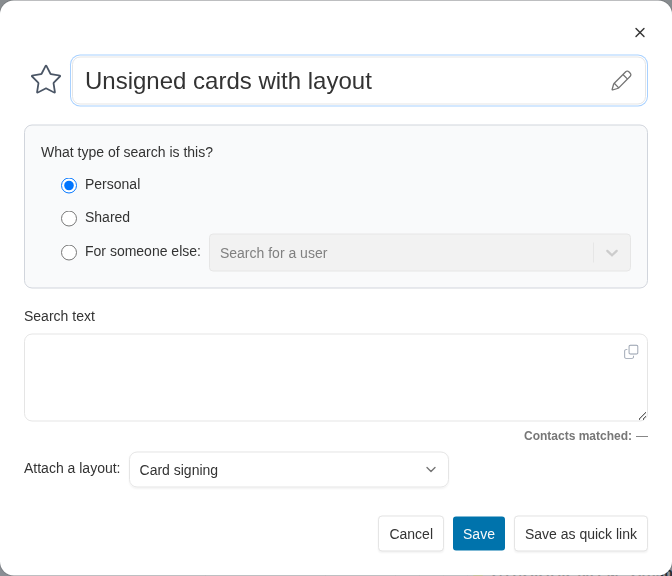 6. Click **Save**. Each time the search is run in the future, Broadstripes automatically displays the columns defined in the attached layout.
## Change or remove an attached layout
To change the layout attached to an existing saved search, edit the search and select a different layout from the **Attach a layout** dropdown — or select **None** to remove the layout attachment.
6. Click **Save**. Each time the search is run in the future, Broadstripes automatically displays the columns defined in the attached layout.
## Change or remove an attached layout
To change the layout attached to an existing saved search, edit the search and select a different layout from the **Attach a layout** dropdown — or select **None** to remove the layout attachment.