> ## Documentation Index
> Fetch the complete documentation index at: https://help.broadstripes.com/llms.txt
> Use this file to discover all available pages before exploring further.
# Data import fields
export default function DataImportFieldsTable() {
const {useRef, useState, useEffect} = React;
const personNameRef = useRef(null);
const organizationNameRef = useRef(null);
const contactInfoRef = useRef(null);
const personAddressRef = useRef(null);
const organizationAddressRef = useRef(null);
const employmentRef = useRef(null);
const leadershipRef = useRef(null);
const timelineItemsRef = useRef(null);
const customFieldsRef = useRef(null);
const basicInfoRef = useRef(null);
const fieldsData = [{
category: 'Person Name',
field: 'Title',
matching: '',
details: 'Traditionally, this is an abbreviated prefix like "Ms." or "Mr.", "Dr.", "Rev.", and so on. It can, of course, be ignored.',
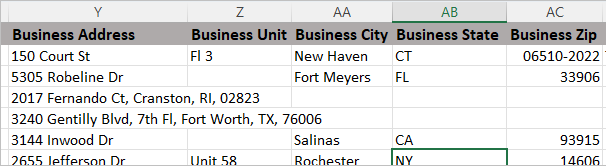
example: 'Correct inconsistencies in the use of abbreviations and periods (e.g., Dr., Dr, Doctor) before importing.',
worksWith: 'Person'
}, {
category: 'Person Name',
field: 'First Name',
matching: 'Yes',
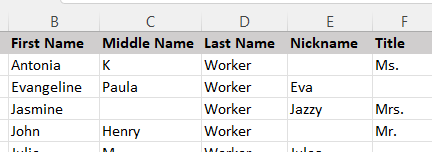
details: 'The "given" name of an individual. Examples: "Louise", "Michael", "Esteban", and so on. Can be used for matching and such.',
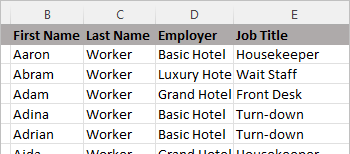
example: 'First, Middle, and Last names must be in separate columns.',
worksWith: 'Person'
}, {
category: 'Person Name',
field: 'Middle Name',
matching: 'Yes',
details: 'This may be the full name or just an initial.',
example:
First, Middle, and Last names must be in separate columns.
,
worksWith: 'Person'
}, {
category: 'Person Name',
field: 'Last Name',
matching: 'Yes',
details: 'The family name of the person',
example: 'First, Middle, and Last names must be in separate columns.',
worksWith: 'Person'
}, {
category: 'Person Name',
field: 'Nickname',
matching: '',
details: 'In this column, you can add any nicknames that could help you identify or keep track of your workers. This field allows you to retain the worker\'s legal name in your data while allowing people to search for them by the name they are commonly called.',
example: 'The familiar name by which the person is known. Examples: Lou, Mike, or Steve',
worksWith: 'Person'
}, {
category: 'Person Name',
field: 'Suffix',
matching: '',
details: 'Anything the person adds to their name after the last name. Examples: "Jr." and "III".',
example: 'Any suffixes such as Jr., Senior, II, III.',
worksWith: 'Person'
}, {
category: 'Organization Name',
field: 'Organization Name',
matching: 'Yes',
details: 'The official name of the organization',
example: 'Saint Vincent Hospital, MegaBurger, etc.',
worksWith: 'Organization'
}, {
category: 'Organization Name',
field: 'Nickname',
matching: '',
details: 'If the organization is commonly called something other than its official name, input it here.',
example: 'Saint Vincent Hospital\'s nickname could be SVH.',
worksWith: 'Organization'
}, {
category: 'Contact Info',
field: 'Phone',
matching: 'Yes',
details: 'The 10 digit phone number',
example: 'The phone number column will accept a standard 10 digit phone number: 261-444-7899, (718) 184-6654, etc',
worksWith: 'All'
}, {
category: 'Contact Info',
field: 'Phone Notes',
matching: '',
details: 'This field contains any notes or information you want to record about the contact\'s phone number.',
example: 'New notes will be appended if the notes field in the app already contains data.',
worksWith: 'All'
}, {
category: 'Contact Info',
field: 'Phone Bad',
matching: '',
details: 'The "Phone Bad" fields are numbers you want to retain but are invalid.',
example: 'When importing a bad phone number, more than one column is necessary. The applicable rows will contain:
Bad: Yes, True, T, 1, X
Not Bad: No, False, F, 0
',
worksWith: 'All'
}, {
category: 'Contact Info',
field: 'Phone Is Primary',
matching: '',
details: 'Designates a phone number as the primary phone. When set to true, any existing primary phone is automatically demoted.',
example: 'Column header examples: Home Phone Is Primary, Business Phone Is Primary, Other Phone Is Primary. Accepted values:
TRUE: Yes, True, T, 1, X
FALSE: No, False, F, 0
',
worksWith: 'All'
}, {
category: 'Contact Info',
field: 'Cell Phone',
matching: '',
details: 'The 10-digit mobile phone number',
example: 'The phone number column should not include *',
worksWith: 'All'
}, {
category: 'Contact Info',
field: 'Cell Phone Notes',
matching: '',
details: 'This field contains any notes or information you want to record about the contact\'s cellular number.',
example: 'Theresa turns off her cell phone after 7 pm. New notes will be appended if the notes field in the app already contains data.',
worksWith: 'All'
}, {
category: 'Contact Info',
field: 'Cell Phone Bad',
matching: '',
details: 'The "Phone Bad" fields are numbers you want to retain but are invalid.',
example: 'When importing a bad phone number, more than one column is necessary. The applicable rows will contain:
Bad: Yes, True, T, 1, X
Not Bad: No, False, F, 0
',
worksWith: 'All'
}, {
category: 'Contact Info',
field: 'Cell Phone Permission',
matching: '',
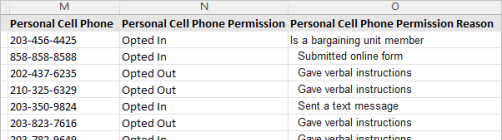
details: 'The Cell Phone Permission data field indicates if a contact gives permission to receive phone communications.',
example:
A Cell Phone Permission entry can be one of two values or blank:
Opted in
Opted out
,
worksWith: 'All'
}, {
category: 'Contact Info',
field: 'Cell Phone Permission Reason',
matching: '',
details: 'The "Cell Phone Permission Reason" data field records how a contact gave permission to contact or to opt out of communication.',
example: 'The following permission reasons may be entered:
Signed paper form
Submitted online form
Clicked emailed link (or sent an email)
Sent a text message
Gave verbal instructions
Is a bargaining unit member (Opted-in only)
Set in external
',
worksWith: 'All'
}, {
category: 'Contact Info',
field: 'Cell Phone Is Primary',
matching: '',
details: 'Designates a cell phone number as the primary phone. When set to true, any existing primary phone is automatically demoted.',
example: 'Column header examples: Home Cell Phone Is Primary, Business Cell Phone Is Primary, Personal Cell Phone Is Primary. Accepted values:
TRUE: Yes, True, T, 1, X
FALSE: No, False, F, 0
',
worksWith: 'All'
}, {
category: 'Contact Info',
field: 'Email',
matching: 'Yes',
details: 'The email address of the contact',
example: 'jane@example.com',
worksWith: 'All'
}, {
category: 'Contact Info',
field: 'Email Notes',
matching: '',
details: 'The Email Notes field should contain any relevant information about a contact\'s email.',
example: 'This email address should be used if Ken does not respond to the primary. New notes will not be imported if the notes field already contains data.',
worksWith: 'All'
}, {
category: 'Contact Info',
field: 'Email Bad',
matching: '',
details: 'The "Email Bad" field is an email that you want to retain but is not valid.',
example: 'When importing a bad email address, more than one column is necessary. The applicable rows will contain:
Bad: Yes, True, T, 1, X
Not Bad: No, False, F, 0
',
worksWith: 'All'
}, {
category: 'Contact Info',
field: 'Email Permission',
matching: '',
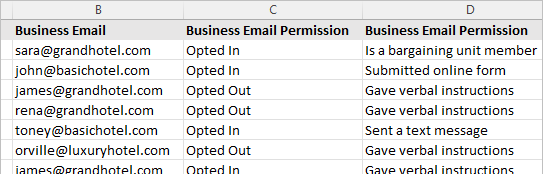
details: 'The Email Permission data field indicates if a contact gives permission to receive email communications.',
example:
An Email Permission entry can be one of two values or blank:
Opted in
Opted out
,
worksWith: 'All'
}, {
category: 'Contact Info',
field: 'Email Permission Reason',
matching: '',
details: 'The "Email Permission Reason" data field are a record of how a contact gave permission to contact or to opt out of communication.',
example: 'The following permission reasons may be entered:
Signed paper form
Submitted online form
Clicked emailed link (or sent an email)
Sent a text message
Gave verbal instructions
Is a bargaining unit member (Opted-in only)
Set in external
',
worksWith: 'All'
}, {
category: 'Contact Info',
field: 'Email Is Primary',
matching: '',
details: 'Designates an email address as the primary email. When set to true, any existing primary email is automatically demoted.',
example: 'Column header examples: Personal Email Is Primary, Business Email Is Primary, Other Email Is Primary. Accepted values:
TRUE: Yes, True, T, 1, X
FALSE: No, False, F, 0
',
worksWith: 'All'
}, {
category: 'Contact Info',
field: 'Fax',
matching: '',
details: 'The fax number of a contact',
example: '261-444-7899',
worksWith: 'All'
}, {
category: 'Contact Info',
field: 'Fax Notes',
matching: '',
details: 'Any notes or information you want to record about the contact\'s fax number.',
example: 'New notes will not be imported if the notes field already contains data. Fax number is a shared line. Confirm receipt with follow-up call after fax., etc',
worksWith: 'All'
}, {
category: 'Contact Info',
field: 'Fax Bad',
matching: '',
details: 'The "Fax Bad" fields are fax numbers that you want to retain but are not valid.',
example: 'When importing a bad fax number, more than one column is necessary. The applicable rows will contain:
Bad: Yes, True, T, 1, X
Not Bad: No, False, F, 0
',
worksWith: 'All'
}, {
category: 'Contact Info',
field: 'Fax Is Primary',
matching: '',
details: 'Designates a fax number as the primary fax. When set to true, any existing primary fax is automatically demoted.',
example: 'Column header examples: Home Fax Is Primary, Business Fax Is Primary, Other Fax Is Primary. Accepted values:
TRUE: Yes, True, T, 1, X
FALSE: No, False, F, 0
',
worksWith: 'All'
}, {
category: 'Contact Info',
field: 'Pager',
matching: '',
details: 'The pager number of the contact',
example: 'The phone number column will accept a standard 10 digit phone number: 261-444-7899, (718) 184-6654, etc',
worksWith: 'All'
}, {
category: 'Contact Info',
field: 'Pager Notes',
matching: '',
details: 'This field contains any notes or information you want to record about the contact\'s pager number.',
example: 'If the notes field already contains data, new notes will be appended.. John is a driver. It may take hours before he is able to respond.',
worksWith: 'All'
}, {
category: 'Contact Info',
field: 'Pager Bad',
matching: '',
details: 'The "Pager Bad" field is a phone number that you want to retain but are not valid.',
example: 'When importing a bad phone number, more than one column is necessary. The applicable rows will contain:
Bad: Yes, True, T, 1, X
Not Bad: No, False, F, 0
',
worksWith: 'All'
}, {
category: 'Contact Info',
field: 'Pager Is Primary',
matching: '',
details: 'Designates a pager number as the primary pager. When set to true, any existing primary pager is automatically demoted.',
example: 'Column header examples: Home Pager Is Primary, Business Pager Is Primary, Other Pager Is Primary. Accepted values:
TRUE: Yes, True, T, 1, X
FALSE: No, False, F, 0
',
worksWith: 'All'
}, {
category: 'Contact Info',
field: 'IM',
matching: '',
details: 'The URL or handle for Instant Messenger',
example: 'Enter the person\'s instant messenger info here.',
worksWith: 'All'
}, {
category: 'Contact Info',
field: 'IM Notes',
matching: '',
details: 'Any notes or information you want to record about the contact\'s Instant Messenger.',
example: 'If the notes field already contains data, new notes will be appended.',
worksWith: 'All'
}, {
category: 'Contact Info',
field: 'IM Bad',
matching: '',
details: 'The "IM Bad" fields are instant messenger urls or handles that you want to retain but are not valid.',
example: 'When importing a bad IM handle, more than one column is necessary. The applicable rows will contain:
Bad: Yes, True, T, 1, X
Not Bad: No, False, F, 0
',
worksWith: 'All'
}, {
category: 'Contact Info',
field: 'IM Is Primary',
matching: '',
details: 'Designates an instant messenger handle as the primary IM. When set to true, any existing primary IM is automatically demoted.',
example: 'Column header examples: Home IM Is Primary, Business IM Is Primary, Other IM Is Primary. Accepted values:
TRUE: Yes, True, T, 1, X
FALSE: No, False, F, 0
',
worksWith: 'All'
}, {
category: 'Person Address',
field: 'Address',
matching: 'Yes',
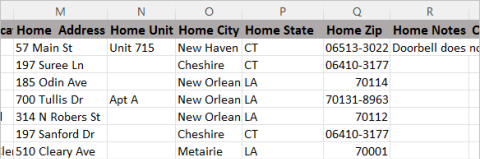
details: 'The street address of the contact',
example:
100 Shepard Ave., 658 N. Main St. etc. If you do not have your address formatted in separate columns, you may alternatively enter the full address in this column, e.g. 100 Shepard Ave., Tuscaloosa, AL 35487
,
worksWith: 'Person'
}, {
category: 'Person Address',
field: 'Unit',
matching: '',
details: 'A unit or suite number in the contact\'s address.',
example: '3rd Fl, Unit 454, Apt 3B, etc',
worksWith: 'Person'
}, {
category: 'Person Address',
field: 'City',
matching: 'Yes',
details: 'The city the address is located in',
example: 'Tuscaloosa, Springfield, Houston, etc.',
worksWith: 'Person'
}, {
category: 'Person Address',
field: 'State',
matching: 'Yes',
details: 'The two-letter abbreviation for the state.',
example: 'CT, NY, NV, etc',
worksWith: 'Person'
}, {
category: 'Person Address',
field: 'Zip',
matching: 'Yes',
details: 'The 5-digit zip code or 9-digit zip code, including the plus-four code.',
example: '37042, 73099-1039, etc',
worksWith: 'Person'
}, {
category: 'Person Address',
field: 'Address Notes',
matching: '',
details: 'Any notes or information you want to record about the contact\'s address.',
example: 'Doorbell does not work. Knock hard. The column header should include the appropriate group: Home Notes, Business Notes, Other Notes',
worksWith: 'Person'
}, {
category: 'Person Address',
field: 'Address Bad',
matching: '',
details: 'The "Address Bad" fields are addresses that you want to retain but are not valid.',
example: 'When importing a bad address, more than one column is necessary. The applicable rows will contain:
Bad: Yes, True, T, 1, X
Not Bad: No, False, F, 0
',
worksWith: 'Person'
}, {
category: 'Person Address',
field: 'Address Is Primary',
matching: '',
details: 'Designates an address as the primary address for the contact. When set to true, any existing primary address is automatically demoted.',
example: 'Column header examples: Home Address Is Primary, Business Address Is Primary, Other Address Is Primary. Accepted values:
TRUE: Yes, True, T, 1, X
FALSE: No, False, F, 0
',
worksWith: 'Person'
}, {
category: 'Organization Address',
field: 'Address',
matching: 'Yes',
details: 'The street address of an organization. An organization may have a Business address, or anOther address.',
example:
100 Shepard Ave., 658 N. Main St. etc. If you do not have your address formatted in separate columns, you may alternatively enter the full address in this column, e.g. 100 Shepard Ave., Tuscaloosa, AL 35487
,
worksWith: 'Organization'
}, {
category: 'Organization Address',
field: 'Unit',
matching: '',
details: 'A unit or suite number in the contact\'s address.',
example: '3rd Fl, Unit 454, Apt 3B, etc.',
worksWith: 'Organization'
}, {
category: 'Organization Address',
field: 'City',
matching: 'Yes',
details: 'The city the address is located in',
example: 'Tuscaloosa, Springfield, Houston, etc.',
worksWith: 'Organization'
}, {
category: 'Organization Address',
field: 'State',
matching: 'Yes',
details: 'The two-letter abbreviation for the state.',
example: 'CT, NY, NV, etc',
worksWith: 'Organization'
}, {
category: 'Organization Address',
field: 'Zip',
matching: 'Yes',
details: 'The 5 digit zip code or 9 digit code including the plus-four code.',
example: '37042, 73099-1039, etc',
worksWith: 'Organization'
}, {
category: 'Organization Address',
field: 'Address Notes',
matching: '',
details: 'Any notes or information you want to record about the organization\'s address.',
example: 'Doorbell does not work. Knock hard. The column header should include the appropriate category: Business Notes, Other Notes',
worksWith: 'Organization'
}, {
category: 'Organization Address',
field: 'Address Bad',
matching: '',
details: 'The "Address Bad" fields are addresses that you want to retain but are not valid.',
example: 'When importing a bad address, more than one column is necessary. The applicable rows will contain:
Bad: Yes, True, T, 1, X
Not Bad: No, False, F, 0
',
worksWith: 'Organization'
}, {
category: 'Organization Address',
field: 'Address Is Primary',
matching: '',
details: 'Designates an address as the primary address for the organization. When set to true, any existing primary address is automatically demoted.',
example: 'Column header examples: Business Address Is Primary, Other Address Is Primary. Accepted values:
TRUE: Yes, True, T, 1, X
FALSE: No, False, F, 0
',
worksWith: 'Organization'
}, {
category: 'Employment',
field: 'Employer',
matching: 'Yes',
details: 'The name of the organization that is the employer.',
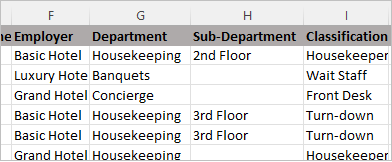
example: 'The main name of an organization e.g. Grand City Hospital, The Grand Hotel, Mega University, etc. If the employer does not exist in your project, a new organization will be created.',
worksWith: 'Person'
}, {
category: 'Employment',
field: 'Department',
matching: 'Yes',
details: 'An employer may have different sections, floors, units, etc. A department is a child organization of an employer.',
example: 'e.g. Accounting, Concierge, North Campus, etc.',
worksWith: 'Person'
}, {
category: 'Employment',
field: 'Subdepartment',
matching: 'Yes',
details: 'Larger organizations may be subdivided into multi-level structures. A subdepartment is a division of a department which is part of a employer.',
example:
e.g. 3rd Floor, West Pavilion, VIP Lounge, etc. If the subdepartment does not exist in your project, a new organization will be created in your project.
,
worksWith: 'Person'
}, {
category: 'Employment',
field: 'Subsubdepartment',
matching: 'Yes',
details: 'Larger organizations may be subdivided into multi-level structures. A subsubdepartment is a division of a second level department.',
example: 'e.g. Clerical, Special Units, etc. If the subsubdepartment does not exist in your project, a new organization will be created in your project.',
worksWith: 'Person'
}, {
category: 'Employment',
field: 'Subsubsubdepartment',
matching: 'Yes',
details: 'Larger organizations may be subdivided into multi-level structures. A subsubsubdepartment is a division of a third level department.',
example: 'e.g. Casual, Level E, etc. If the subsubsubdepartment does not exist in your project, a new organization will be created in your project.',
worksWith: 'Person'
}, {
category: 'Employment',
field: 'Classification or Job Title',
matching: '',
details: 'Classification/Job Title is the title/role of an employee.',
example:
Housekeeper, Unit Clerk II, Teacher\'s Assistant, etc.
,
worksWith: 'Person'
}, {
category: 'Employment',
field: 'Employee Number',
matching: '',
details: 'This field records the worker\'s employee number.',
example: 'This field is a free-form text box that will accept any combination of text that is applicable.',
worksWith: 'Person'
}, {
category: 'Employment',
field: 'Employee Status',
matching: '',
details: 'This field can indicate the status of worker',
example: 'Floater, Permanent, Temp, etc',
worksWith: 'Person'
}, {
category: 'Employment',
field: 'Bargaining Unit Member',
matching: '',
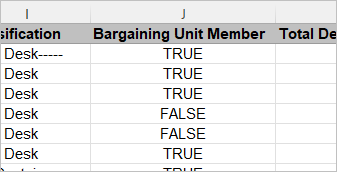
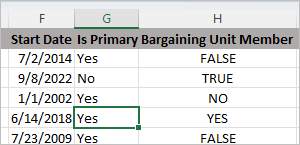
details: 'This field indicates if a person is a member of a bargaining unit. This is a yes/no checkbox, which may or may not suit your union\'s needs for keeping track of members.',
example:
The Union Member field may contain one of the following values for each contact:
TRUE: Yes, True, T, 1, X
FALSE: No, False, F, 0
,
worksWith: 'Person'
}, {
category: 'Employment',
field: 'Hourly Rate',
matching: '',
details: 'This field records the worker\'s hourly wage',
example: '17.23, 20.00, etc.',
worksWith: 'Person'
}, {
category: 'Employment',
field: 'Hours',
matching: '',
details: 'This field records the worker\'s hours worked',
example: '32.5, 17:15, etc.',
worksWith: 'Person'
}, {
category: 'Employment',
field: 'Start Date',
matching: '',
details: 'This field records worker\'s start date in MM/DD/YYYY format.',
example: '01/22/2019, 11/03/1982, etc.',
worksWith: 'Person'
}, {
category: 'Employment',
field: 'Date Ended',
matching: '',
details: 'The date the employment terminated.',
example: 'This field records the last date of employment in MM/DD/YYYY format.',
worksWith: 'Person'
}, {
category: 'Employment',
field: 'Date Last Paid',
matching: '',
details: 'The date the worker last received their wages',
example: 'This field records worker\'s last payday in MM/DD/YYYY format.',
worksWith: 'Person'
}, {
category: 'Employment',
field: 'Seniority Date',
matching: '',
details: 'This field records worker\'s seniority date in MM/DD/YYYY format.',
example: '01/22/2019, 11/03/1982, etc.',
worksWith: 'Person'
}, {
category: 'Employment',
field: 'Recent Hire Date',
matching: '',
details: 'This field records worker\'s most recent hire date (in the case of a rehire) in MM/DD/YYYY format.',
example: '01/22/2019, 11/03/1982, etc.',
worksWith: 'Person'
}, {
category: 'Employment',
field: 'Is Primary',
matching: '',
details: 'When a worker has more than one concurrent employments, this field will indicate which employment is the primary.',
example:
This column may contain one of the following values for each contact:
TRUE: Yes, True, T, 1, X
FALSE: No, False, F, 0
,
worksWith: 'Person'
}, {
category: 'Employment',
field: 'Tip Card',
matching: '',
details: 'This field indicates if a worker has a tip card.',
example: 'This column may contain one of the following values for each contact:
TRUE: Yes, True, T, 1, X
FALSE: No, False, F, 0
',
worksWith: 'Person'
}, {
category: 'Employment',
field: 'Full Part Time',
matching: '',
details: 'This field contains the worker\'s full time or part time status.',
example: 'Full-time, part-time, Casual, etc.',
worksWith: 'Person'
}, {
category: 'Employment',
field: 'Work Location',
matching: '',
details: 'The location where the person works.',
example: 'Fordham Road, Front of House, etc.',
worksWith: 'Person'
}, {
category: 'Leadership',
field: 'Leader Role',
matching: '',
details: 'The Leader role provides a way to categorize and identify the leaders within a bargaining unit or worker group. Account admins can create leader roles as needed for the project.',
example: 'Committee, Key Leader, Target, etc. If the leader role category of an imported contact, does not exist, a new leader role will be created.',
worksWith: 'Person'
}, {
category: 'Leadership',
field: 'Leader Unique ID',
matching: '',
details: 'The unique identifier of an external system.',
example: 'This spreadsheet column should be mapped to the Broadstripes field named after the external system (i.e. Leader Big Hospital ID if you named the external system "Big Hospital"). The Broadstripes ID is also a unique ID.',
worksWith: 'Person'
}, {
category: 'Leadership',
field: 'Follower Unique ID',
matching: '',
details: 'The unique identifier of an external system that belongs to a follower.',
example: 'This spreadsheet column should be mapped to the Broadstripes field named after the external system (i.e. Follower Big Hospital ID if you named the external system "Big Hospital"). The Broadstripes ID is also a unique ID.',
worksWith: 'Person'
}, {
category: 'Leadership',
field: 'Leader Broadstripes ID',
matching: '',
details: 'The Broadstripes ID is a set of 6 alphanumeric characters that are unique identifiers exclusive to the app.',
example: 'This field contains the Broadstripes ID of the leader of a group. UTO-559, LST-470, etc.',
worksWith: 'Person'
}, {
category: 'Leadership',
field: 'Follower Broadstripes ID',
matching: '',
details: 'The Broadstripes ID is a set of 6 alphanumeric characters that are unique identifiers exclusive to the app.',
example: 'This field contains the Broadstripes ID of the follower of a worker. UTO-559, LST-470, etc.',
worksWith: 'Person'
}, {
category: 'Basic Info',
field: 'Notes',
matching: '',
details: 'The notes fields is a built-in memo field which can be used to store any textual information you choose about a contact.',
example: 'When you match to an existing contact and upload new data to the Notes field, it is appended to any existing text already in the field. This behavior is unique to this field.',
worksWith: 'Person'
}, {
category: 'Basic Info',
field: 'Relationships',
matching: '',
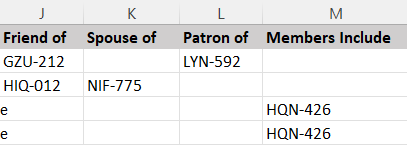
details: 'The relationships field allows you to ability to track special relationships between individual workers. Some relationships are automatically available for use, such as Friend of, neighbor of, etc. More relationships can be created by Broadstripes support upon admin request.',
example:
The header of this column should include the type of relationship, e.g. Family member of, Connected to, Members include. The values will include the Broadstripes ID of the person or organization you want to connect.
,
worksWith: 'All'
}, {
category: 'Basic Info',
field: 'Party',
matching: '',
details: 'If your project includes voter data, you can use the Party field to enter registered voters\' party affiliation.',
example: 'Be sure to check for spelling and grammatical errors. If a value does not exactly match an existing value a new one will be created. You should also check for reiterations of the same party. For example, Dem and Democrat will create two separate values even though they signify the same party.',
worksWith: 'Person'
}, {
category: 'Basic Info',
field: 'Union Member',
matching: '',
details: 'This is a yes/no checkbox, which may or may not suit your union\'s needs for keeping track of members. If you choose not to use this field, there are other tools in Broadstripes to track union membership.',
example: 'The Union Member field may contain one of the following values for each contact:
TRUE: Yes, True, T, 1, X
FALSE: False
',
worksWith: 'Person'
}, {
category: 'Basic Info',
field: 'Birth Date',
matching: '',
details: 'Birth dates are useful when trying to correctly identify workers with common names or the same name, and also may be used for matching employer records.',
example: 'This field records worker birth dates in MM/DD/YYYY format.',
worksWith: 'Person'
}, {
category: 'Basic Info',
field: 'Website',
matching: '',
details: 'Both people and organizations can have a website. For workers, this field can be useful for storing Facebook or Twitter account links, blog pages, and so on. The data in this field will be displayed as a Web link.',
example: 'Insert full URLs https://www.example.com',
worksWith: 'All'
}, {
category: 'Basic Info',
field: 'Contact Type',
matching: '',
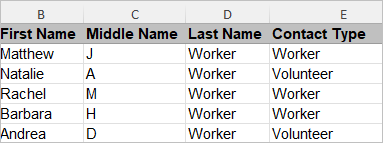
details: 'Broadstripes project admins can create "contact types" to capture the distinctions between different types of people and organizations. For example, an external organizing campaign might have two types of people: "Workers" and "Managers." A community organizing campaign might have "Media," "Elected Officials," and "Neighborhood Leaders." Examples of organization sub-types in a healthcare campaign might be "Hospital," "Department," "Clinic," and so on. Contact type can\'t be set in bulk anywhere else, so this can be a handy feature of the import.',
example:
The contact type must exist in the project already.
,
worksWith: 'All'
}, {
category: 'Basic Info',
field: 'Unique IDs',
matching: 'Yes',
details: 'If you\'re uploading data from an external system for the first time, you will probably want to map the column containing the unique ID from that system to the Broadstripes field intended to capture it (the "external system ID" that was automatically created when you or another admin created the external system). For example, if you have an excelsior list (aka "the e-list") list provided by an employer, it will often (though not always) have a column containing a unique ID for each worker, under a header like "ID," "Employee ID," etc. In order to capture this unique ID and match on it when an updated list is provided, a Broadstripes admin should create an external system named "E-list" or "Employer" (or whatever makes sense to the organizing team). Doing that will automatically create a field named "E-list ID" or "Employer ID" in Broadstripes.',
example: 'This spreadsheet column should be mapped to the Broadstripes field named after the external system (i.e. Big Hospital ID if you named the external system "Big Hospital"). The Broadstripes ID is also a unique ID.',
worksWith: 'All'
}, {
category: 'Basic Info',
field: 'Events',
matching: '',
details: 'You can use events to record and track literal union-organized events, like rallies and marches, but you can also use events to keep track of important one-time information or occurrences, like petition signatures or signing a union card. You can even use events for answering multiple yes/no questions about the workers in the bargaining unit. For more information on using events, click here. Importing event data requires that you create an event, and then create as many "steps" under the event as you need to capture your data.',
example:
The column header for Events should start with the event name followed by a colon and the the step name. For example: If your project has an event called July Rally and and event step called Invited, the column header would be July Rally: Invited. Mark the applicable contacts with an X in their corresponding row of the column
,
worksWith: 'All'
}, {
category: 'Basic Info',
field: 'Lists',
matching: '',
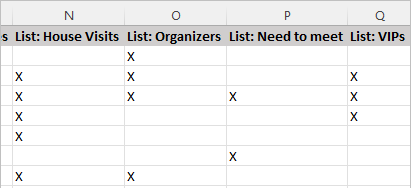
details: 'Lists give you an easy way to manually tag individuals who you want to track as a group for any reason. You can find additional information on tag lists here.',
example:
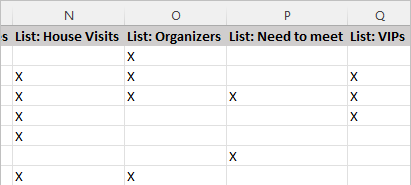
To add a contact to a list, you need to create a column whose header starts with List: followed by the name of the list that you want updated (A new list will be created if the name provided does not match an existing list.) In the rows of the corresponding contacts enter X to add that contact to the list.
,
worksWith: 'All'
}, {
category: 'Basic Info',
field: 'Assessment or Code',
matching: '',
details: 'Assessments or codes are excellent way to assess where the workers stand in relation to the campaign\'s goals',
example: 'Assessments must be imported in numeric form, and must fall within the range of the possible values in the project. Depending on your project settings, the column header will either be Assessment or Code.',
worksWith: 'All'
}, {
category: 'Custom Fields',
field: 'Custom fields - Checkboxes',
matching: '',
details: 'Checkboxes are used to indicate data that can either be true or false. The header of this column should be the actual name of the custom field.',
example: 'This column may contain one of the following values for each contact:
TRUE: Yes, True, T, 1, X
FALSE: No, False, F, 0
',
worksWith: 'All'
}, {
category: 'Custom Fields',
field: 'Custom fields - Single line text fields',
matching: '',
details: 'This field may be used for free-form text, a date or number.',
example: 'If data already exists in this field for a contact, it will be overwritten with new data in an import.',
worksWith: 'All'
}, {
category: 'Custom Fields',
field: 'Custom fields - Multi-line text fields',
matching: '',
details: 'Multi-line text input fields allow free-form text with line breaks.',
example: 'If data already exists in this field for a contact, it will be overwritten with new data in an import.',
worksWith: 'All'
}, {
category: 'Custom Fields',
field: 'Custom fields - Dropdown chooser',
matching: '',
details: 'Dropdown choosers allows a select set of values for a data field. This field allows one value.',
example: 'If the value to be imported into Broadstripes is not already an option in the dropdown chooser, you must enable the option to "Allow imports to add options." This feature will allow the app to create new options via data import. You can implement this by selecting it on the custom field\'s edit page.',
worksWith: 'All'
}, {
category: 'Custom Fields',
field: 'Custom fields - Multiple selection chooser',
matching: '',
details: 'Multiple selection choosers allows a select set of values for a data field. This field may have more than one value.',
example: 'Values are separated by commas, e.g. Healthcare, Wages, Coverage. The values included in an import will overwrite the existing data in this field. If the value to be imported into Broadstripes is not already an option in the dropdown chooser, you must enable the option to "Allow imports to add options." This feature will allow the app to create new options via data import. You can implement this by selecting it on the custom field\'s edit page.',
worksWith: 'All'
}, {
category: 'Custom Fields',
field: 'Custom fields - Sortable lists',
matching: '',
details: 'Sortable lists are usually used to indicate levels of importance or priority by allowing the adjustment of a value\'s position.',
example: 'If the value to be imported into Broadstripes is not already an option in the dropdown chooser, you must enable the option to "Allow imports to add options." This feature will allow the app to create new options via data import. You can implement this by selecting it on the custom field\'s edit page.',
worksWith: 'All'
}, {
category: 'Custom Fields',
field: 'Custom fields - Time',
matching: '',
details: 'This field is used to record a time of an event such as a petition signing, etc.',
example: '01:23 PM, 2:47, etc.',
worksWith: 'All'
}, {
category: 'Timeline Items',
field: 'Timeline Item Type',
matching: '',
details: 'This column indicates how the timeline item will be categorized.',
example: 'The timeline item type may include: Note, Group Meeting, House Visit, One-on-one, Phone Call, User-defined timeline item type (e.g. Training, Information Session, etc.)',
worksWith: 'All'
}, {
category: 'Timeline Items',
field: 'Timeline Item Date',
matching: '',
details: 'The date on which interaction or event occurred.',
example: '3/15/2022, 11/7/14, etc.',
worksWith: 'All'
}, {
category: 'Timeline Items',
field: 'Timeline Item Description',
matching: '',
details: 'This column is where you would describe the details of the occurrence.',
example: 'Henrietta seems to have a better understanding of what a union would mean for her and her family. She said she would attend the next meeting on Tuesday.',
worksWith: 'All'
}, {
category: 'Timeline Items',
field: 'Timeline Item Contacted by Unique ID',
matching: '',
details: 'This data field identifies the person who contacted this person using a Unique ID',
example: 'This must be a unique ID such as a Broadstripes ID or an external system ID (e.g. Timeline Item Contacted by Broadstripes ID, Timeline Item Contacted by CNET ID, etc.)',
worksWith: 'All'
}];
const categories = ['Person Name', 'Organization Name', 'Contact Info', 'Person Address', 'Organization Address', 'Employment', 'Leadership', 'Basic Info', 'Custom Fields', 'Timeline Items'];
const jumpToSection = section => {
const refs = {
'Basic Info': basicInfoRef,
'Person Name': personNameRef,
'Organization Name': organizationNameRef,
'Contact Info': contactInfoRef,
'Person Address': personAddressRef,
'Organization Address': organizationAddressRef,
'Employment': employmentRef,
'Leadership': leadershipRef,
'Timeline Items': timelineItemsRef,
'Custom Fields': customFieldsRef
};
refs[section]?.current?.scrollIntoView({
behavior: 'smooth',
block: 'start'
});
};
const getSectionRef = category => {
switch (category) {
case 'Basic Info':
return basicInfoRef;
case 'Person Name':
return personNameRef;
case 'Organization Name':
return organizationNameRef;
case 'Contact Info':
return contactInfoRef;
case 'Person Address':
return personAddressRef;
case 'Organization Address':
return organizationAddressRef;
case 'Employment':
return employmentRef;
case 'Leadership':
return leadershipRef;
case 'Timeline Items':
return timelineItemsRef;
case 'Custom Fields':
return customFieldsRef;
default:
return null;
}
};
const [selectedCategory, setSelectedCategory] = useState('');
const [isDark, setIsDark] = useState(false);
useEffect(() => {
const checkTheme = () => {
const isDarkMode = document.documentElement.getAttribute('data-theme') === 'dark' || document.documentElement.classList.contains('dark') || window.matchMedia && window.matchMedia('(prefers-color-scheme: dark)').matches;
setIsDark(isDarkMode);
};
checkTheme();
const observer = new MutationObserver(checkTheme);
observer.observe(document.documentElement, {
attributes: true,
attributeFilter: ['data-theme', 'class']
});
const mediaQuery = window.matchMedia('(prefers-color-scheme: dark)');
mediaQuery.addListener(checkTheme);
return () => {
observer.disconnect();
mediaQuery.removeListener(checkTheme);
};
}, []);
const colors = {
background: isDark ? '#1f2937' : '#ffffff',
backgroundSecondary: isDark ? '#374151' : '#f9fafb',
backgroundTertiary: isDark ? '#3b82f6' : '#0ea5e9',
backgroundQuaternary: isDark ? '#baad97' : '#ffecc7',
textPrimary: isDark ? '#f9fafb' : '#111827',
textSecondary: isDark ? '#d1d5db' : '#6b7280',
textTertiary: isDark ? '#f9fafb' : '#f9fafb',
borderColor: isDark ? '#4b5563' : '#e5e7eb'
};
const buttonStyle = {
backgroundColor: isDark ? '#374151' : '#f3f4f6',
color: isDark ? '#e5e7eb' : '#374151',
border: '1px solid',
borderColor: isDark ? '#4b5563' : '#e5e7eb'
};
const renderWorksWithBadge = worksWith => {
if (!worksWith) return null;
const getStyle = value => {
switch (value.toLowerCase()) {
case 'all':
return {
backgroundColor: '#3b82f6',
color: 'white',
padding: '4px 8px',
borderRadius: '4px',
fontSize: '0.75rem',
fontWeight: '500',
display: 'inline-block'
};
case 'person':
return {
backgroundColor: '#10b981',
color: 'white',
padding: '4px 8px',
borderRadius: '4px',
fontSize: '0.75rem',
fontWeight: '500',
display: 'inline-block'
};
case 'organization':
return {
backgroundColor: '#f59e0b',
color: 'white',
padding: '4px 8px',
borderRadius: '4px',
fontSize: '0.75rem',
fontWeight: '500',
display: 'inline-block'
};
default:
return {
backgroundColor: '#6b7280',
color: 'white',
padding: '4px 8px',
borderRadius: '4px',
fontSize: '0.75rem',
fontWeight: '500',
display: 'inline-block'
};
}
};
return
{worksWith}
;
};
return <>
{}
Total fields: ({fieldsData.length})
Complete reference guide for mapping spreadsheet columns to Broadstripes fields during import.
Prepare your spreadsheet for import
When importing data into Broadstripes, you need to map your spreadsheet columns to the appropriate Broadstripes fields. Certain data fields will need specific headings to be identified when setting up data mappings on the data import page in Broadstripes. You can define data mappings manually, but using the appropriate column headers will speed up the process. This comprehensive table shows all available fields organized by category.
{}
Jump to section:
{}
{categories.map(category => {
const categoryFields = fieldsData.filter(field => field.category === category);
const ref = getSectionRef(category);
const categoryDescriptions = {
'Person Name': 'Each contact in your spreadsheet must have a name, whether a person or an organization. Broadstripes gives you a lot of flexibility when importing people\'s names, but storing each part of a person\'s name in a separate column is important. (You can find instructions on separating a full name column into first, middle and last name columns here) For people, name fields include:',
'Organization Name': 'For organizations, name fields include:',
'Contact Info': 'Contact information fields allow you to store various ways to reach your contacts:',
'Person Address': 'Address fields for individual people include. You can designate an address as primary during import by adding an "Is Primary" column (e.g. "Home Address Is Primary"). If no primary is set, Broadstripes will auto-assign one.',
'Organization Address': 'Address fields for organizations include:',
'Employment': 'Employment information helps track where people work and their job details:',
'Leadership': 'Leadership fields help identify and categorize leaders within your organization:',
'Basic Info': 'Basic information fields provide additional details about your contacts:',
'Custom Fields': 'Custom fields allow you to store project-specific information:',
'Timeline Items': 'Timeline items track interactions and events with your contacts:'
};
return
;
}
Data import fields reference guide for mapping spreadsheet columns to Broadstripes fields during the import process.
## Available Import Fields
## Important Notes
**Custom Fields**: For dropdown choosers, multiple selection choosers, and sortable lists, you must enable "Allow imports to add options" on the custom field's edit page if you want to import values that don't already exist as options.
**Primary contact info**: You can designate a contact info record or address as primary during import by adding an "Is Primary" column for the relevant type (e.g. "Home Phone Is Primary", "Personal Email Is Primary", "Business Address Is Primary"). When set to true, any existing primary record of the same type is automatically demoted. If no primary is set during import, Broadstripes automatically assigns one.
**Timeline Items**: To create timeline items through import, you need separate columns for Timeline Item Type, Timeline Item Date, Timeline Item Description, and Timeline Contacted by Unique ID.
## Related Articles
* [Import a spreadsheet](/docs/data-import-admin/import-a-spreadsheet) - Step-by-step import process
* [Analyze import results](/docs/data-import-admin/analyze-import-results) - Review and validate your imports
* [Data Import Overview](/docs/data-import-admin/data-import-overview) - General information about data imports