> ## Documentation Index
> Fetch the complete documentation index at: https://help.broadstripes.com/llms.txt
> Use this file to discover all available pages before exploring further.
# Find people and workplaces
> Use the Find people and Find workplaces cards on the homepage to pull up a person's record or list everyone at a work location
Much of the work you do in Broadstripes will begin with finding a record -- one specific person, or all the people at a certain work location. The quickest way to do either is right from your homepage.
## The Find cards
On the **Home** tab of your homepage, you'll see the **Find people** and **Find workplaces** cards. (If your project doesn't have workplaces yet, only **Find people** appears.)
 ## Find people
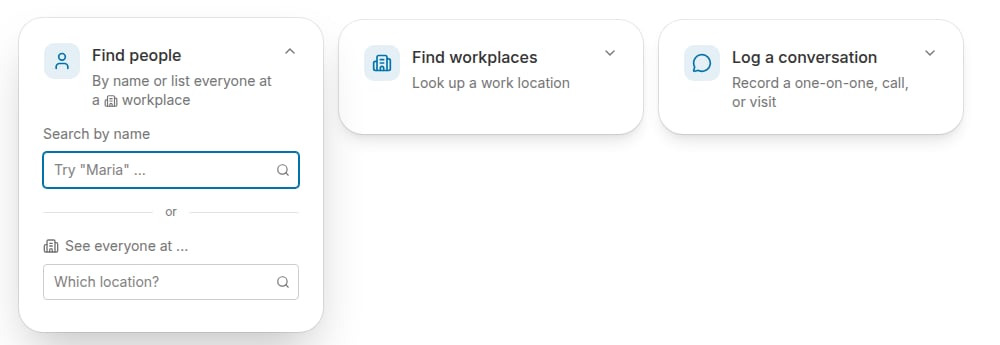
Click the **Find people** card to expand it. It gives you two ways to search:
* **Search by name** -- type a person's name to pull up their individual record.
* **See everyone at ...** -- type a work location into the **"Which location?"** field to list everyone employed there.
## Find people
Click the **Find people** card to expand it. It gives you two ways to search:
* **Search by name** -- type a person's name to pull up their individual record.
* **See everyone at ...** -- type a work location into the **"Which location?"** field to list everyone employed there.
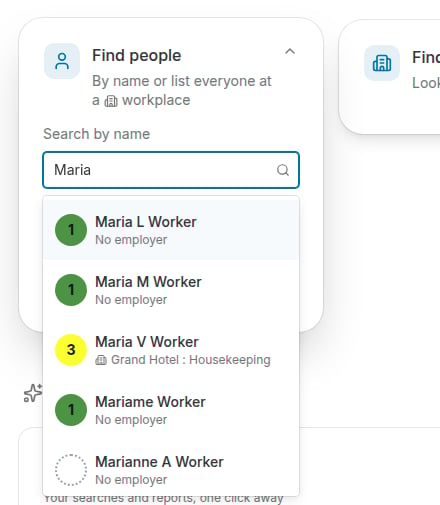
 As you type a name, Broadstripes suggests matching people, showing each person's assessment and workplace. Select a suggestion (or press **Enter**) to run the search.
 The person's record appears in the **Search Results** panel, where you can click their name to open their complete record.
## Find workplaces
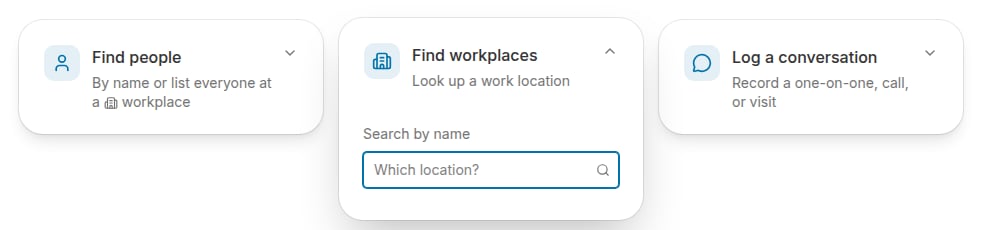
Click the **Find workplaces** card and start typing a work location's name. Select the workplace to run a search for it -- the workplace appears in the **Search Results** panel, where you can click its name to open its record.
The person's record appears in the **Search Results** panel, where you can click their name to open their complete record.
## Find workplaces
Click the **Find workplaces** card and start typing a work location's name. Select the workplace to run a search for it -- the workplace appears in the **Search Results** panel, where you can click its name to open its record.
 The Find cards are the fastest way to look up a record, but they aren't the only way to search Broadstripes. You can [search for a person by name](/docs/getting-started/search-by-name) from the search bar at the top of any page, and the search builder lets you search using a host of additional criteria. Learn about building your own custom search in the [Search builder](/docs/search/search-builder-build-an-advanced-search) article.