> ## Documentation Index
> Fetch the complete documentation index at: https://help.broadstripes.com/llms.txt
> Use this file to discover all available pages before exploring further.
# Search for a person
> How to search for a person by name in Broadstripes using the search bar autocomplete
Much of the work you do with Broadstripes will begin with a search. Broadstripes' powerful search makes it simple to find and work with your people.
## Search by a worker's name
1. Place the cursor in the search box at the top of the screen, just to the right of the Broadstripes logo, and begin typing the name of someone you'd like to find.
2. As soon as you've typed a few characters, Broadstripes will begin suggesting the names of people in the database who match your text. Each suggestion shows the person's name and their workplace.
 3. When you see the person you're looking for, use your mouse or the **up-** and **down-arrow keys** to select their name, then press **Enter** to run the search.
4. The person's record will appear in the **Search Results** panel.
5. From the **Search Results** panel, you can click on the person's **name** to open their complete record. You can also click the **Quick view icon** () in the **Quick view** column to open a dialog with their contact info and other key data.
3. When you see the person you're looking for, use your mouse or the **up-** and **down-arrow keys** to select their name, then press **Enter** to run the search.
4. The person's record will appear in the **Search Results** panel.
5. From the **Search Results** panel, you can click on the person's **name** to open their complete record. You can also click the **Quick view icon** () in the **Quick view** column to open a dialog with their contact info and other key data.
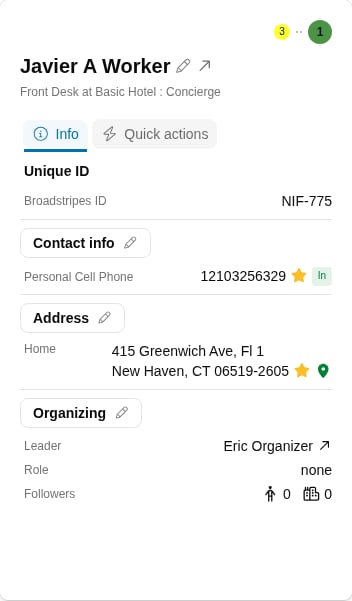 6. The **Quick view** dialog has two tabs:
* The **Info** tab shows the person's Broadstripes ID, phone numbers, email addresses, home address, and organizing information.
* The **Quick actions** tab provides shortcuts for common tasks like adding a timeline item, calling, sending an SMS, or jumping to the person's record.
6. The **Quick view** dialog has two tabs:
* The **Info** tab shows the person's Broadstripes ID, phone numbers, email addresses, home address, and organizing information.
* The **Quick actions** tab provides shortcuts for common tasks like adding a timeline item, calling, sending an SMS, or jumping to the person's record.