> ## Documentation Index
> Fetch the complete documentation index at: https://help.broadstripes.com/llms.txt
> Use this file to discover all available pages before exploring further.
# Using a multi-value search
The Multi-value Search feature in Broadstripes CRM allows you to search for multiple values in a single field using a special parentheses syntax. Instead of creating separate search rules for each value, you can combine them into one efficient search statement.
**Key benefits:**
* Search for multiple values at once
* Cleaner, more concise search queries
* Faster than creating multiple individual search rules
* Works with any searchable field
***
 ## Basic syntax
The multi-value search uses **parentheses with comma-separated values**:
```
field=operator(value1, value2, value3)
```
### Components:
* **field**: Any searchable field name (e.g., `city`, `state`, `employer`, `name`)
* **operator**: Standard search operators (`=`, `:`, `==`, `!=`, `!:`, `!==`)
* **parentheses**: Wrap your list of values in `(` and `)`
* **commas**: Separate each value with a comma
**Multi-word values must be wrapped in quotes.**
`membertype = ("Active Member", "Retired Member", "Non-Member")`
is equivalent to
`membertype = "Active Member" OR membertype = "Retired Member" OR membertype = "Non-Member"`
***
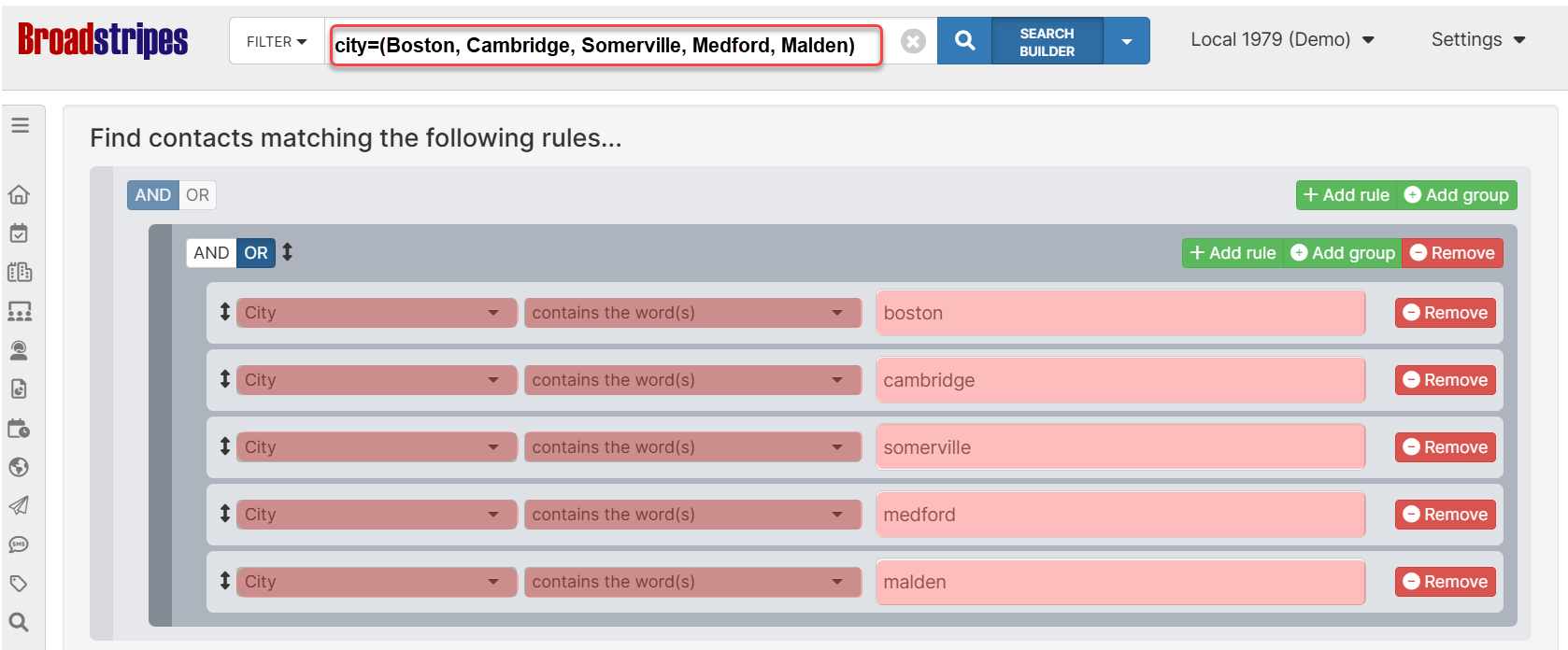
## Traditional 'OR' search vs multi-value search
**Traditional approach**
To find contacts in multiple cities, you'd create multiple rules:
```
city=Boston OR city=Cambridge OR city=Somerville OR city=Medford OR city=Malden
```
**Multi-value approach**
Much simpler and cleaner:
```
city=(Boston, Cambridge, Somerville, Medford, Malden)
```
**Benefits of multi-value:**
* ✓ Shorter, more readable queries
* ✓ Easier to modify (add/remove values)
* ✓ Less prone to syntax errors
***
## How it works: OR vs AND logic
The behavior of multi-value search depends on the operator you use:
**Positive operators → OR logic**
When using positive operators (`=`, `:`, `==`), values are combined with **OR** logic:
```
city=(Boston, Cambridge, Somerville)
```
**Meaning:** Find records where city equals Boston **OR** Cambridge **OR** Somerville
**Negative operators → AND logic**
When using negative operators (`!=`, `!:`, `!==`), values are combined with **AND** logic:
```
city!=(Boston, Cambridge, Somerville)
```
**Meaning:** Find records where city is NOT Boston **AND** NOT Cambridge **AND** NOT Somerville
***
## Basic examples
**Example 1: Search multiple cities**
Find contacts in Boston, New York, or Chicago:
```
city=(Boston, "New York", Chicago)
```
**Example 2: Search multiple states**
Find contacts in Connecticut or Massachusetts:
```
state=(CT, MA)
```
**Example 3: Search multiple employers**
Find contacts working at specific companies:
```
employer=(Acme, Globex, Initech)
```
**Example 4: Exclude multiple values**
Find contacts NOT in certain cities:
```
city!=(Boston, Cambridge)
```
**Example 5: Search by multiple names**
Find specific people:
```
name=(John Smith, Jane Doe, Bob Johnson)
```
***
## Handling values with commas
If a value itself contains commas (like company names or addresses), wrap it in **quotes**:
```
employer=("Dewey, Cheetham, and Howe", "Smith, Jones & Associates", Acme)
```
**How it works:**
* Values inside quotes are treated as a single value
* Only commas outside quotes separate values
* Use double quotes `"` to wrap values
More examples:
```
# Company names with commas
employer=("ABC, Inc.", "XYZ Corporation", "123 Industries, LLC")
# Addresses with commas
address=("123 Main St, Suite 100", "456 Oak Ave, Floor 2")
# Names with commas (Last, First format)
name=("Smith, John", "Doe, Jane", "Johnson, Bob")
```
***
## Advanced use cases
**Combining with other search rules**
Multi-value search works seamlessly with other search criteria using AND/OR logic:
**Example:** Find contacts in multiple cities AND working at specific employers:
```
city=(Boston, Cambridge) employer=(Acme, Globex)
```
**Example:** Find contacts in multiple states OR with specific job titles:
```
state=(MA, CT) OR title=(Manager, Director)
```
**Nested searches with subqueries**
You can combine multi-value syntax with subqueries using square brackets:
```
employer=[state=(CT, MA, RI)]
```
**Meaning:** Find contacts whose employer's state is Connecticut, Massachusetts, or Rhode Island
**Complex organization searches**
```
employer=("Acme Corporation", "Globex Industries", "Initech, LLC")
employer.city=(Boston, Cambridge, Somerville)
```
**Meaning:** Find contacts at those specific companies located in those cities
***
## Real-world scenarios
**Scenario 1: Regional sales team**
Find all contacts in New England states:
```
state=(MA, CT, RI, NH, VT, ME)
```
**Scenario 2: Multiple account managers**
Find contacts assigned to specific account managers:
```
account_manager=(John Smith, Jane Doe, Bob Wilson)
```
**Scenario 3: Event participation**
Find contacts who attended specific events:
```
memberactivity=(Summer Conference, Fall Meetup, Winter Summit)
```
**Scenario 4: Exclude test data**
Exclude contacts from test companies:
```
employer!=(Test Company, Demo Corp, Sample Inc)
```
**Scenario 5: Metropolitan area search**
Find contacts in a metro area with multiple city names:
```
city=(Boston, Brookline, Cambridge, Somerville, Medford, Malden)
```
**Scenario 6: Industry-specific search**
Find contacts in specific industries:
```
industry=(Technology, Software, IT Services, Computer Hardware)
```
***
## Common pitfalls
**❌ Forgetting quotes for values with commas**
```
✗ employer=(Smith, Jones & Associates, Acme)
# Will be split into 3 values: "Smith", "Jones & Associates", "Acme"
✓ employer=("Smith, Jones & Associates", Acme)
# Correctly creates 2 values
```
**❌ Mixing up OR and AND logic**
```
# This finds contacts in Boston OR Cambridge
city=(Boston, Cambridge)
# This finds contacts NOT in Boston AND NOT in Cambridge
city!=(Boston, Cambridge)
# If you want "NOT in Boston OR NOT in Cambridge", you need:
city!=Boston OR city!=Cambridge
```
***
## Quick reference
### Syntax cheat sheet
```
# Basic multi-value (OR logic)
field=(value1, value2, value3)
# Negated multi-value (AND logic)
field!=(value1, value2, value3)
# With quoted values
field=("value with, comma", value2, "value with spaces")
# Contains operator
field:(value1, value2)
# Exact match operator
field==(value1, value2)
# Not contains
field!:(value1, value2)
```
### Operator reference
| Operator | Logic | Example | Meaning |
| -------- | ----- | --------------------------- | ---------------------------------------------------------------------------------------------- |
| `=` | OR | `city=(Boston, Cambridge)` | Matches whole words in any order - finds Boston OR Cambridge |
| `:` | OR | `employer:(Acme, Globex)` | Matches word fragments in any order - finds Acme OR Globex (including "AcmeCorp", "GlobexCom") |
| `==` | OR | `state==(MA, CT)` | Matches exactly - finds MA OR CT |
| `!=` | AND | `city!=(Boston, Cambridge)` | Excludes whole words - does NOT contain Boston AND NOT contain Cambridge |
| `!:` | AND | `employer!:(Test, Demo)` | Excludes word fragments - does NOT contain Test AND NOT contain Demo |
| `!==` | AND | `state!==(NY, NJ)` | Excludes exact matches (not case sensitive) - is NOT exactly NY AND NOT exactly NJ |
## Basic syntax
The multi-value search uses **parentheses with comma-separated values**:
```
field=operator(value1, value2, value3)
```
### Components:
* **field**: Any searchable field name (e.g., `city`, `state`, `employer`, `name`)
* **operator**: Standard search operators (`=`, `:`, `==`, `!=`, `!:`, `!==`)
* **parentheses**: Wrap your list of values in `(` and `)`
* **commas**: Separate each value with a comma
**Multi-word values must be wrapped in quotes.**
`membertype = ("Active Member", "Retired Member", "Non-Member")`
is equivalent to
`membertype = "Active Member" OR membertype = "Retired Member" OR membertype = "Non-Member"`
***
## Traditional 'OR' search vs multi-value search
**Traditional approach**
To find contacts in multiple cities, you'd create multiple rules:
```
city=Boston OR city=Cambridge OR city=Somerville OR city=Medford OR city=Malden
```
**Multi-value approach**
Much simpler and cleaner:
```
city=(Boston, Cambridge, Somerville, Medford, Malden)
```
**Benefits of multi-value:**
* ✓ Shorter, more readable queries
* ✓ Easier to modify (add/remove values)
* ✓ Less prone to syntax errors
***
## How it works: OR vs AND logic
The behavior of multi-value search depends on the operator you use:
**Positive operators → OR logic**
When using positive operators (`=`, `:`, `==`), values are combined with **OR** logic:
```
city=(Boston, Cambridge, Somerville)
```
**Meaning:** Find records where city equals Boston **OR** Cambridge **OR** Somerville
**Negative operators → AND logic**
When using negative operators (`!=`, `!:`, `!==`), values are combined with **AND** logic:
```
city!=(Boston, Cambridge, Somerville)
```
**Meaning:** Find records where city is NOT Boston **AND** NOT Cambridge **AND** NOT Somerville
***
## Basic examples
**Example 1: Search multiple cities**
Find contacts in Boston, New York, or Chicago:
```
city=(Boston, "New York", Chicago)
```
**Example 2: Search multiple states**
Find contacts in Connecticut or Massachusetts:
```
state=(CT, MA)
```
**Example 3: Search multiple employers**
Find contacts working at specific companies:
```
employer=(Acme, Globex, Initech)
```
**Example 4: Exclude multiple values**
Find contacts NOT in certain cities:
```
city!=(Boston, Cambridge)
```
**Example 5: Search by multiple names**
Find specific people:
```
name=(John Smith, Jane Doe, Bob Johnson)
```
***
## Handling values with commas
If a value itself contains commas (like company names or addresses), wrap it in **quotes**:
```
employer=("Dewey, Cheetham, and Howe", "Smith, Jones & Associates", Acme)
```
**How it works:**
* Values inside quotes are treated as a single value
* Only commas outside quotes separate values
* Use double quotes `"` to wrap values
More examples:
```
# Company names with commas
employer=("ABC, Inc.", "XYZ Corporation", "123 Industries, LLC")
# Addresses with commas
address=("123 Main St, Suite 100", "456 Oak Ave, Floor 2")
# Names with commas (Last, First format)
name=("Smith, John", "Doe, Jane", "Johnson, Bob")
```
***
## Advanced use cases
**Combining with other search rules**
Multi-value search works seamlessly with other search criteria using AND/OR logic:
**Example:** Find contacts in multiple cities AND working at specific employers:
```
city=(Boston, Cambridge) employer=(Acme, Globex)
```
**Example:** Find contacts in multiple states OR with specific job titles:
```
state=(MA, CT) OR title=(Manager, Director)
```
**Nested searches with subqueries**
You can combine multi-value syntax with subqueries using square brackets:
```
employer=[state=(CT, MA, RI)]
```
**Meaning:** Find contacts whose employer's state is Connecticut, Massachusetts, or Rhode Island
**Complex organization searches**
```
employer=("Acme Corporation", "Globex Industries", "Initech, LLC")
employer.city=(Boston, Cambridge, Somerville)
```
**Meaning:** Find contacts at those specific companies located in those cities
***
## Real-world scenarios
**Scenario 1: Regional sales team**
Find all contacts in New England states:
```
state=(MA, CT, RI, NH, VT, ME)
```
**Scenario 2: Multiple account managers**
Find contacts assigned to specific account managers:
```
account_manager=(John Smith, Jane Doe, Bob Wilson)
```
**Scenario 3: Event participation**
Find contacts who attended specific events:
```
memberactivity=(Summer Conference, Fall Meetup, Winter Summit)
```
**Scenario 4: Exclude test data**
Exclude contacts from test companies:
```
employer!=(Test Company, Demo Corp, Sample Inc)
```
**Scenario 5: Metropolitan area search**
Find contacts in a metro area with multiple city names:
```
city=(Boston, Brookline, Cambridge, Somerville, Medford, Malden)
```
**Scenario 6: Industry-specific search**
Find contacts in specific industries:
```
industry=(Technology, Software, IT Services, Computer Hardware)
```
***
## Common pitfalls
**❌ Forgetting quotes for values with commas**
```
✗ employer=(Smith, Jones & Associates, Acme)
# Will be split into 3 values: "Smith", "Jones & Associates", "Acme"
✓ employer=("Smith, Jones & Associates", Acme)
# Correctly creates 2 values
```
**❌ Mixing up OR and AND logic**
```
# This finds contacts in Boston OR Cambridge
city=(Boston, Cambridge)
# This finds contacts NOT in Boston AND NOT in Cambridge
city!=(Boston, Cambridge)
# If you want "NOT in Boston OR NOT in Cambridge", you need:
city!=Boston OR city!=Cambridge
```
***
## Quick reference
### Syntax cheat sheet
```
# Basic multi-value (OR logic)
field=(value1, value2, value3)
# Negated multi-value (AND logic)
field!=(value1, value2, value3)
# With quoted values
field=("value with, comma", value2, "value with spaces")
# Contains operator
field:(value1, value2)
# Exact match operator
field==(value1, value2)
# Not contains
field!:(value1, value2)
```
### Operator reference
| Operator | Logic | Example | Meaning |
| -------- | ----- | --------------------------- | ---------------------------------------------------------------------------------------------- |
| `=` | OR | `city=(Boston, Cambridge)` | Matches whole words in any order - finds Boston OR Cambridge |
| `:` | OR | `employer:(Acme, Globex)` | Matches word fragments in any order - finds Acme OR Globex (including "AcmeCorp", "GlobexCom") |
| `==` | OR | `state==(MA, CT)` | Matches exactly - finds MA OR CT |
| `!=` | AND | `city!=(Boston, Cambridge)` | Excludes whole words - does NOT contain Boston AND NOT contain Cambridge |
| `!:` | AND | `employer!:(Test, Demo)` | Excludes word fragments - does NOT contain Test AND NOT contain Demo |
| `!==` | AND | `state!==(NY, NJ)` | Excludes exact matches (not case sensitive) - is NOT exactly NY AND NOT exactly NJ |