> ## Documentation Index
> Fetch the complete documentation index at: https://help.broadstripes.com/llms.txt
> Use this file to discover all available pages before exploring further.
# Search builder
> Use the search builder to create advanced, multi-criteria searches without writing search text by hand.
## Overview
The **search builder** is a visual tool that helps you construct complex searches by selecting fields, operators, and values from dropdown menus. Instead of typing search syntax directly, you build your search one rule at a time.
The search builder is especially useful when you want to filter by multiple criteria at once. For example, you might want to find:
* Workers at a particular employer who have been assessed as "1s"
* People who attended a recent event but haven't been contacted lately
* Members on a specific shift who haven't signed a card
## Open the search builder
Click the **Search Builder** button in the top navigation bar, next to the search icon.
 The search builder panel opens above the search results area.
## Build a search with rules
When the search builder opens, you see a single empty rule with the heading **Find contacts matching the following rules...**
The search builder panel opens above the search results area.
## Build a search with rules
When the search builder opens, you see a single empty rule with the heading **Find contacts matching the following rules...**
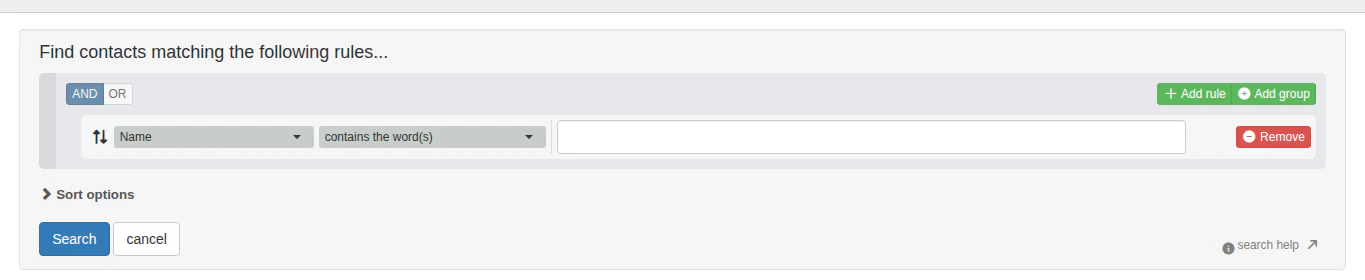 Each rule has three parts:
1. **Field** — choose what to search by (e.g., Shift, Assessment, Employer, Name, events, custom fields)
2. **Operator** — choose how to match (e.g., "contains the word(s)," "matches the text," "equals," "has any value")
3. **Value** — enter or select the value to match against (some operators like "has any value" don't require a value)
### Available search fields
The field dropdown includes all searchable data in your project, organized by category:
* **Custom fields** — any custom fields configured for your project (e.g., Shift, Pay Rate)
* **Events and event steps** — events and their individual steps
* **Contact info** — address, email, phone number
* **Contact timeline** — timeline notes, dates, and authors
* **General** — name, assessment, contact type, notes, lists
* **Department structure** — employer, department, parent organization
* **Employment** — job title, work location, employee status, seniority date
* **Leadership** — leader assignments, turf, roles
* **Relationships** — related contacts, family members, grievants
* **Email and texting** — sent messages, delivery status, SMS history
* **Call center** — call outcomes, call pools, callers
* **External IDs** — IDs from external systems
* **Contact types** — your project's configured contact types
* **Shapes** — geographic shape group membership
### Add rules to narrow your search
Click **+ Add rule** to add another condition. When using multiple rules, choose whether contacts must match **AND** (all rules) or **OR** (any rule) using the toggle at the top of the builder.
Each rule has three parts:
1. **Field** — choose what to search by (e.g., Shift, Assessment, Employer, Name, events, custom fields)
2. **Operator** — choose how to match (e.g., "contains the word(s)," "matches the text," "equals," "has any value")
3. **Value** — enter or select the value to match against (some operators like "has any value" don't require a value)
### Available search fields
The field dropdown includes all searchable data in your project, organized by category:
* **Custom fields** — any custom fields configured for your project (e.g., Shift, Pay Rate)
* **Events and event steps** — events and their individual steps
* **Contact info** — address, email, phone number
* **Contact timeline** — timeline notes, dates, and authors
* **General** — name, assessment, contact type, notes, lists
* **Department structure** — employer, department, parent organization
* **Employment** — job title, work location, employee status, seniority date
* **Leadership** — leader assignments, turf, roles
* **Relationships** — related contacts, family members, grievants
* **Email and texting** — sent messages, delivery status, SMS history
* **Call center** — call outcomes, call pools, callers
* **External IDs** — IDs from external systems
* **Contact types** — your project's configured contact types
* **Shapes** — geographic shape group membership
### Add rules to narrow your search
Click **+ Add rule** to add another condition. When using multiple rules, choose whether contacts must match **AND** (all rules) or **OR** (any rule) using the toggle at the top of the builder.
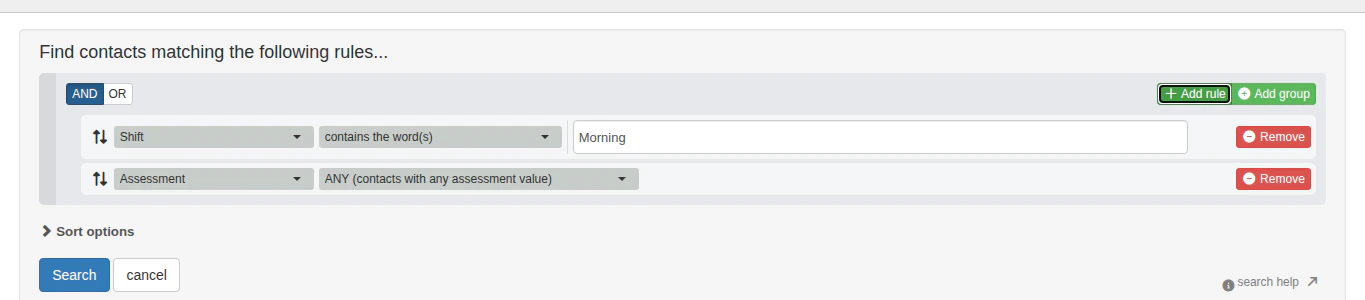 In this example, the search finds contacts whose **Shift** field contains "Morning" **AND** who have any **Assessment** value.
### Add rule groups for complex logic
Click **Add group** to create a nested set of rules with its own AND/OR logic. Rule groups let you build searches like: "Find contacts at Employer X who are assessed as 1 **AND** (attended Committee Meeting **OR** signed a Card)."
In this example, the search finds contacts whose **Shift** field contains "Morning" **AND** who have any **Assessment** value.
### Add rule groups for complex logic
Click **Add group** to create a nested set of rules with its own AND/OR logic. Rule groups let you build searches like: "Find contacts at Employer X who are assessed as 1 **AND** (attended Committee Meeting **OR** signed a Card)."
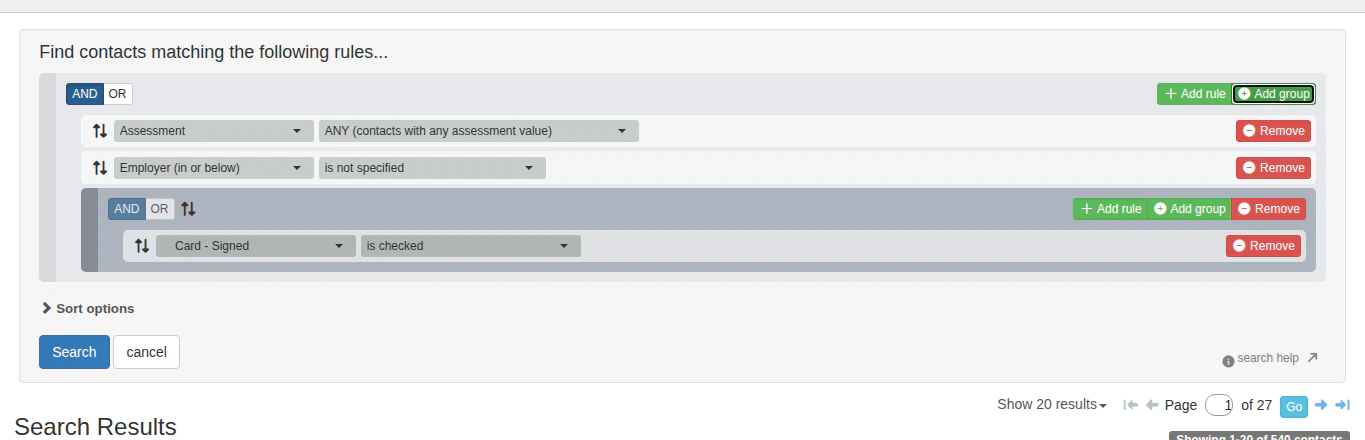 Each group has its own **AND/OR** toggle and its own **+ Add rule**, **Add group**, and **Remove** buttons. You can nest groups to create complex search logic.
For a detailed guide on using multiple rules and rule groups, see [Search with multiple rules](/docs/search/search-with-multiple-rules) and [Add rule groups to your search](/docs/search/add-rule-groups-to-your-search).
### Remove a rule
Click the **Remove** button next to any rule to delete it from the search.
## Sort options
Click **Sort options** to expand the sort section. You can select a saved sort to control the order of your search results.
## Execute your search
When your rules are ready, click **Search** to run the search. Click **cancel** to close the builder without searching.
After executing, Broadstripes displays your search results with colored filter badges showing your active search criteria.
Each group has its own **AND/OR** toggle and its own **+ Add rule**, **Add group**, and **Remove** buttons. You can nest groups to create complex search logic.
For a detailed guide on using multiple rules and rule groups, see [Search with multiple rules](/docs/search/search-with-multiple-rules) and [Add rule groups to your search](/docs/search/add-rule-groups-to-your-search).
### Remove a rule
Click the **Remove** button next to any rule to delete it from the search.
## Sort options
Click **Sort options** to expand the sort section. You can select a saved sort to control the order of your search results.
## Execute your search
When your rules are ready, click **Search** to run the search. Click **cancel** to close the builder without searching.
After executing, Broadstripes displays your search results with colored filter badges showing your active search criteria.
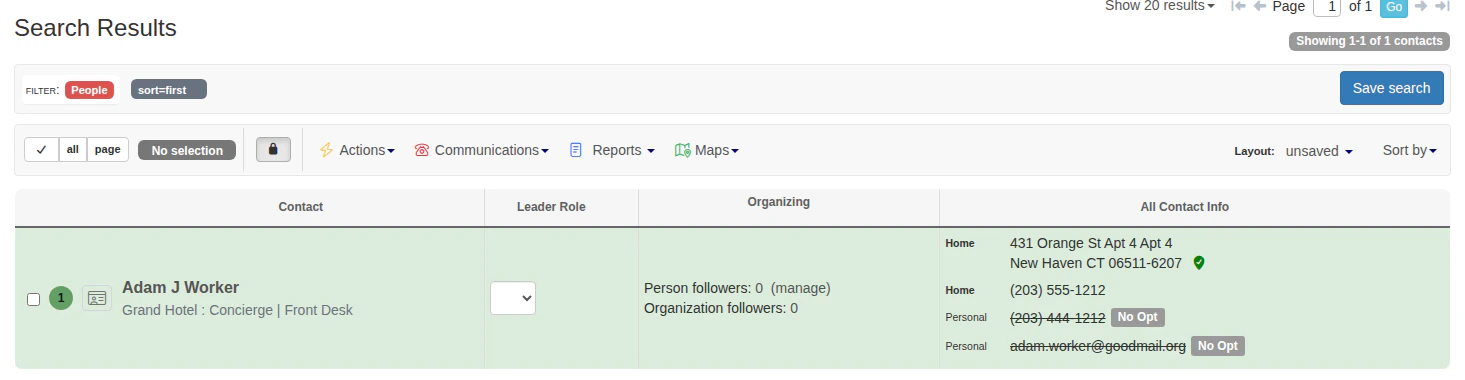 From the results page, you can:
* Click a filter badge's **×** to remove that criterion
* Click **Save this search** to save the search for later
* Reopen the search builder to modify your search
## Video: How to search with the search builder
From the results page, you can:
* Click a filter badge's **×** to remove that criterion
* Click **Save this search** to save the search for later
* Reopen the search builder to modify your search
## Video: How to search with the search builder
## Get help
Click the **search help** link in the bottom-right corner of the search builder to visit the knowledge base for help with building searches.
## What's next
Learn more about building custom searches:
* [Search with multiple rules](/docs/search/search-with-multiple-rules)
* [Add rule groups to your search](/docs/search/add-rule-groups-to-your-search)
* [Broadstripes search language](/docs/search/search-language-reference)