> ## Documentation Index
> Fetch the complete documentation index at: https://help.broadstripes.com/llms.txt
> Use this file to discover all available pages before exploring further.
# Sort search results
After running a search, you may want results to display in a certain order. For instance, if you're interested in gauging support, you'll want to sort by workers' assessment codes. With Broadstripes, sorting search results is just a few clicks away. Here's how it's done:
## Sort search results
1. Click the **Sort by** link located just above your search results on the right-hand side of the page.
2. Choose to **Build new sort...**
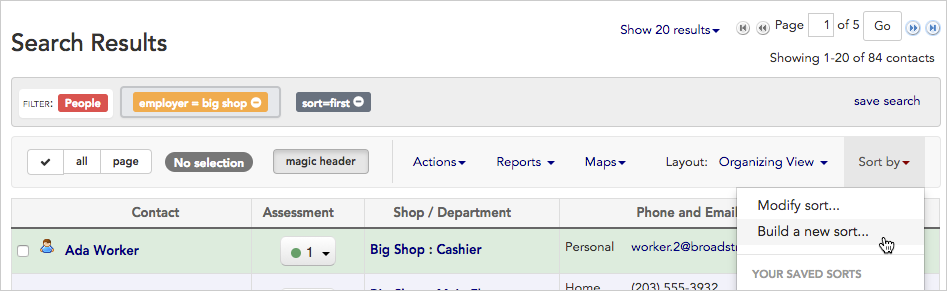 3. A sort-building tool will open.
4. Using this sort builder, **click once on any field** to include it in your sort. Each field you choose will be added to the upper portion of the sort builder.
5. We'll choose **Assessment** (sometimes labeled "Code") since we are interested in having the results sorted by workers' assessments, and then **Last name**, so the workers will be ordered alphabetically under each assessment code.
3. A sort-building tool will open.
4. Using this sort builder, **click once on any field** to include it in your sort. Each field you choose will be added to the upper portion of the sort builder.
5. We'll choose **Assessment** (sometimes labeled "Code") since we are interested in having the results sorted by workers' assessments, and then **Last name**, so the workers will be ordered alphabetically under each assessment code.
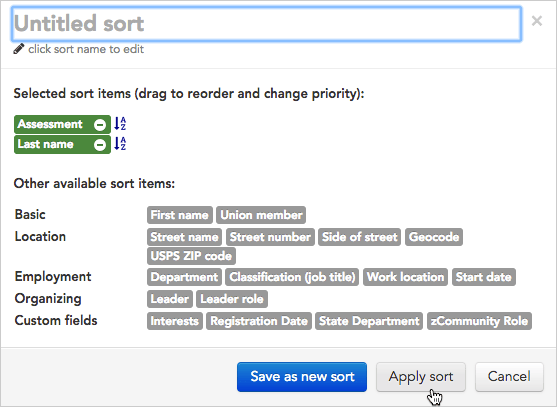 Single-click on a sort item to include it in your sort.
6. Now that we've chosen the fields we want to use in the sort, we can make some adjustments:
* **drag and drop fields** to change the search priority (the field at the top will be sorted first, with each field below acting as a sub-sort)
* click the **A-Z icon** to toggle between ascending and descending order
7. When your sort meets your needs click **Apply sort.**
8. Broadstripes will **re-sort and display** your search results according to your new sort.
Read more about modifying, saving, or sharing useful searches in the [Create and save a sort](/docs/customize/save-a-sort) article.
Single-click on a sort item to include it in your sort.
6. Now that we've chosen the fields we want to use in the sort, we can make some adjustments:
* **drag and drop fields** to change the search priority (the field at the top will be sorted first, with each field below acting as a sub-sort)
* click the **A-Z icon** to toggle between ascending and descending order
7. When your sort meets your needs click **Apply sort.**
8. Broadstripes will **re-sort and display** your search results according to your new sort.
Read more about modifying, saving, or sharing useful searches in the [Create and save a sort](/docs/customize/save-a-sort) article.