> ## Documentation Index
> Fetch the complete documentation index at: https://help.broadstripes.com/llms.txt
> Use this file to discover all available pages before exploring further.
# Actions - Delete contact info
> Delete address, phone, or email information from multiple contacts
## Permanently delete address, phone, and email information from contact records
You can use bulk actions to **permanently delete certain contact information from a contact or group of contacts** from your Broadstripes project. You can delete all types of contact info (addresses, phones and emails) from all groups (personal, business, home and other) or choose a combination of types and groups.
Being able to delete certain contact info can be useful when you make a mistake during your import – for instance importing cell phone numbers as home phones. It might also be used in a case where you want to remove all business phone numbers to avoid accidentally tipping off management to your organizing plans by contacting a person at work.
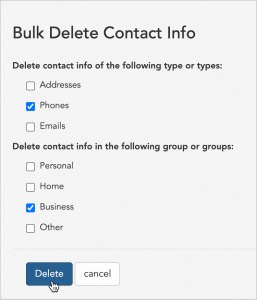
For this example, we'll show how to permanently delete business phone numbers for a group of workers.
1. We'll start by running a search. From the **Search Results** page, we'll [select the workers](/docs/viewing-search-results-and-edit/selecting-deselecting-contacts) whose business numbers we are deleting. (If you need help running a search, check out the [Create and save a search](/docs/search/save-and-share-searches) article.)
2. Next, we'll check **Phones** as the **contact type** and select **Business** as the **group** and click **Delete**.
 3. Broadstripes will automatically queue the process of deleting the selected contact info. A **notification** will appear to confirm the deletion is queued. No further action is needed.
