

Intro
As you probably know, the search results page lets you see the records that match your search criteria and to view details about those contacts (learn more about creating custom searches in the Search section). What you might not know is that the search results page contains another powerful feature – the ability to make bulk edits to multiple contact records at one time. You do this by applying a bulk action to the contacts in your search results. Here’s a look at all of the actions you can apply: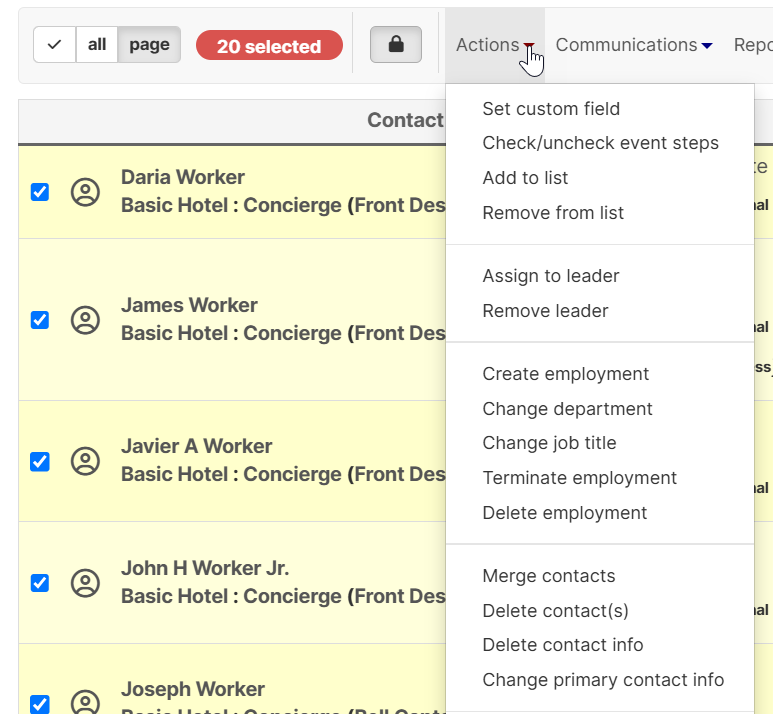
- Set custom field (set or update the value of a custom field for multiple users at once)
- Check/uncheck event steps (check or uncheck steps of an event for multiple contacts in bulk)
- Add to list (add contacts to a tag list in bulk)
- Remove from list (remove contacts from a tag list in bulk)
- Assign to leader (assign a leader to multiple contacts in bulk)
- Remove leader (remove a leadership information from contact records in bulk)
- Create Employment
- Change Department
- Change Job Title
- Terminate Employment
- Delete Employment
- Merge contacts (merge multiple contact records into a single record)
- Delete contacts (permanently delete a contact or group of contact from Broadstripes – cannot be undone)
- Delete contact info (Delete address, phone, and email information from multiple contact records in bulk)
- Change primary contact info (change the primary contact info for multiple contact records in bulk)