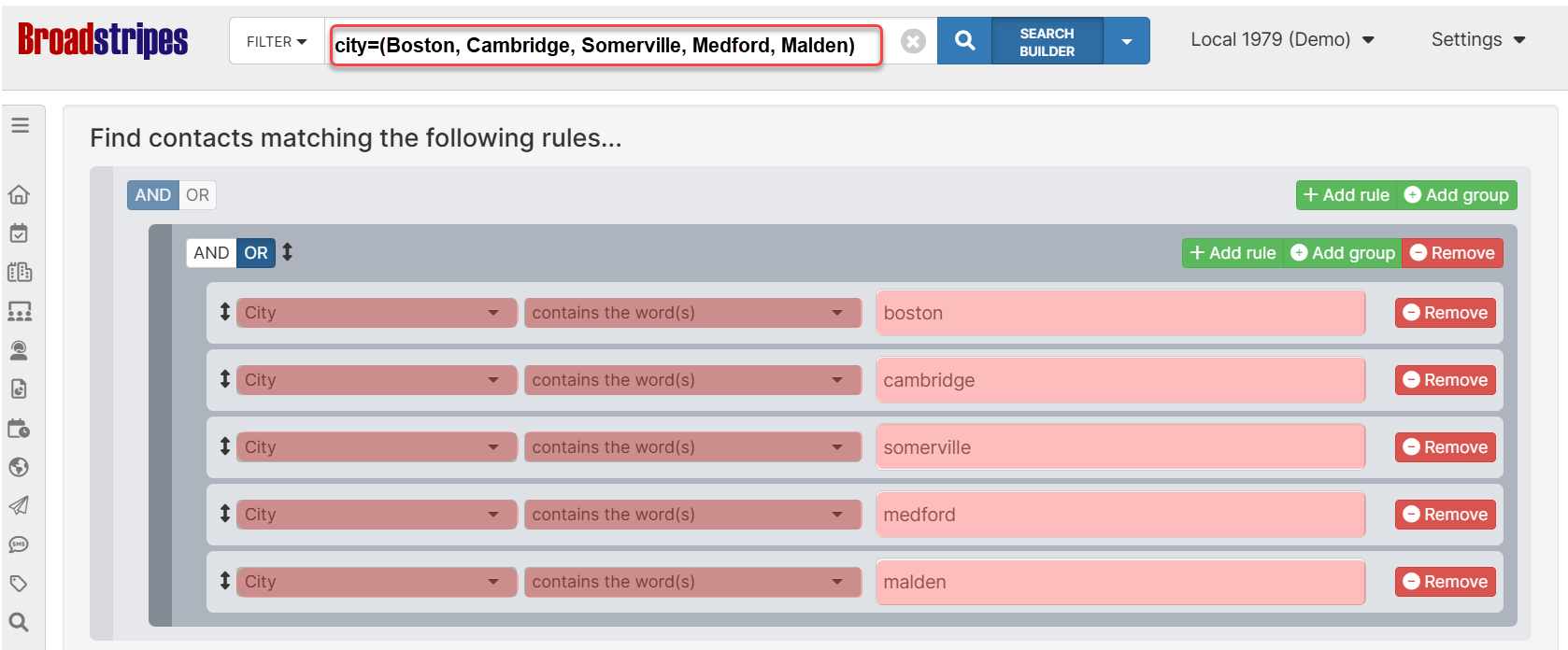
The Multi-value Search feature in Broadstripes CRM allows you to search for multiple values in a single field using a special parentheses syntax. Instead of creating separate search rules for each value, you can combine them into one efficient search statement. Key benefits:
  • Search for multiple values at once
  • Cleaner, more concise search queries
  • Faster than creating multiple individual search rules
  • Works with any searchable field

Multi-value city search

Basic syntax

The multi-value search uses parentheses with comma-separated values:
field=operator(value1, value2, value3)

Components:

  • field: Any searchable field name (e.g., city, state, employer, name)
  • operator: Standard search operators (=, :, ==, !=, !:, !==)
  • parentheses: Wrap your list of values in ( and )
  • commas: Separate each value with a comma
Multi-word values must be wrapped in quotes.membertype = ("Active Member", "Retired Member", "Non-Member") is equivalent to membertype = "Active Member" OR membertype = "Retired Member" OR membertype = "Non-Member"

Traditional approach To find contacts in multiple cities, you’d create multiple rules:
city=Boston OR city=Cambridge OR city=Somerville OR city=Medford OR city=Malden
Multi-value approach Much simpler and cleaner:
city=(Boston, Cambridge, Somerville, Medford, Malden)
Benefits of multi-value:
  • ✓ Shorter, more readable queries
  • ✓ Easier to modify (add/remove values)
  • ✓ Less prone to syntax errors

How it works: OR vs AND logic

The behavior of multi-value search depends on the operator you use: Positive operators → OR logic When using positive operators (=, :, ==), values are combined with OR logic:
city=(Boston, Cambridge, Somerville)
Meaning: Find records where city equals Boston OR Cambridge OR Somerville Negative operators → AND logic When using negative operators (!=, !:, !==), values are combined with AND logic:
city!=(Boston, Cambridge, Somerville)
Meaning: Find records where city is NOT Boston AND NOT Cambridge AND NOT Somerville

Basic examples

Example 1: Search multiple cities Find contacts in Boston, New York, or Chicago:
city=(Boston, "New York", Chicago)
Example 2: Search multiple states Find contacts in Connecticut or Massachusetts:
state=(CT, MA)
Example 3: Search multiple employers Find contacts working at specific companies:
employer=(Acme, Globex, Initech)
Example 4: Exclude multiple values Find contacts NOT in certain cities:
city!=(Boston, Cambridge)
Example 5: Search by multiple names Find specific people:
name=(John Smith, Jane Doe, Bob Johnson)

Handling values with commas

If a value itself contains commas (like company names or addresses), wrap it in quotes:
employer=("Dewey, Cheetham, and Howe", "Smith, Jones & Associates", Acme)
How it works:
  • Values inside quotes are treated as a single value
  • Only commas outside quotes separate values
  • Use double quotes " to wrap values
More examples:
# Company names with commas
employer=("ABC, Inc.", "XYZ Corporation", "123 Industries, LLC")

# Addresses with commas
address=("123 Main St, Suite 100", "456 Oak Ave, Floor 2")

# Names with commas (Last, First format)
name=("Smith, John", "Doe, Jane", "Johnson, Bob")

Advanced use cases

Combining with other search rules Multi-value search works seamlessly with other search criteria using AND/OR logic: Example: Find contacts in multiple cities AND working at specific employers:
city=(Boston, Cambridge) employer=(Acme, Globex)
Example: Find contacts in multiple states OR with specific job titles:
state=(MA, CT) OR title=(Manager, Director)
Nested searches with subqueries You can combine multi-value syntax with subqueries using square brackets:
employer=[state=(CT, MA, RI)]
Meaning: Find contacts whose employer’s state is Connecticut, Massachusetts, or Rhode Island Complex organization searches
employer=("Acme Corporation", "Globex Industries", "Initech, LLC")
employer.city=(Boston, Cambridge, Somerville)
Meaning: Find contacts at those specific companies located in those cities

Real-world scenarios

Scenario 1: Regional sales team Find all contacts in New England states:
state=(MA, CT, RI, NH, VT, ME)
Scenario 2: Multiple account managers Find contacts assigned to specific account managers:
account_manager=(John Smith, Jane Doe, Bob Wilson)
Scenario 3: Event participation Find contacts who attended specific events:
memberactivity=(Summer Conference, Fall Meetup, Winter Summit)
Scenario 4: Exclude test data Exclude contacts from test companies:
employer!=(Test Company, Demo Corp, Sample Inc)
Scenario 5: Metropolitan area search Find contacts in a metro area with multiple city names:
city=(Boston, Brookline, Cambridge, Somerville, Medford, Malden)
Scenario 6: Industry-specific search Find contacts in specific industries:
industry=(Technology, Software, IT Services, Computer Hardware)

Common pitfalls

❌ Forgetting quotes for values with commas
✗ employer=(Smith, Jones & Associates, Acme)
   # Will be split into 3 values: "Smith", "Jones & Associates", "Acme"

✓ employer=("Smith, Jones & Associates", Acme)
   # Correctly creates 2 values
❌ Mixing up OR and AND logic
# This finds contacts in Boston OR Cambridge
city=(Boston, Cambridge)

# This finds contacts NOT in Boston AND NOT in Cambridge
city!=(Boston, Cambridge)

# If you want "NOT in Boston OR NOT in Cambridge", you need:
city!=Boston OR city!=Cambridge

Quick reference

Syntax cheat sheet

# Basic multi-value (OR logic)
field=(value1, value2, value3)

# Negated multi-value (AND logic)
field!=(value1, value2, value3)

# With quoted values
field=("value with, comma", value2, "value with spaces")

# Contains operator
field:(value1, value2)

# Exact match operator
field==(value1, value2)

# Not contains
field!:(value1, value2)

Operator reference

OperatorLogicExampleMeaning
=ORcity=(Boston, Cambridge)Matches whole words in any order - finds Boston OR Cambridge
:ORemployer:(Acme, Globex)Matches word fragments in any order - finds Acme OR Globex (including “AcmeCorp”, “GlobexCom”)
==ORstate==(MA, CT)Matches exactly - finds MA OR CT
!=ANDcity!=(Boston, Cambridge)Excludes whole words - does NOT contain Boston AND NOT contain Cambridge
!:ANDemployer!:(Test, Demo)Excludes word fragments - does NOT contain Test AND NOT contain Demo
!==ANDstate!==(NY, NJ)Excludes exact matches (not case sensitive) - is NOT exactly NY AND NOT exactly NJ