

Search by a worker’s name
- Place the cursor in the search box at the top of the screen, just to the right of the Broadstripes logo, and begin typing the name of someone you’d like to find.
- As soon as you’ve typed a few characters, Broadstripes will begin suggesting the names of people in the database who match your text. Each suggestion shows the person’s name and their workplace.

- When you see the person you’re looking for, use your mouse or the up- and down-arrow keys to select their name, then press Enter to run the search.
- The person’s record will appear in the Search Results panel.
- From the Search Results panel, you can click on the person’s name to open their complete record. You can also click the Quick view icon () in the Quick view column to open a dialog with their contact info and other key data.
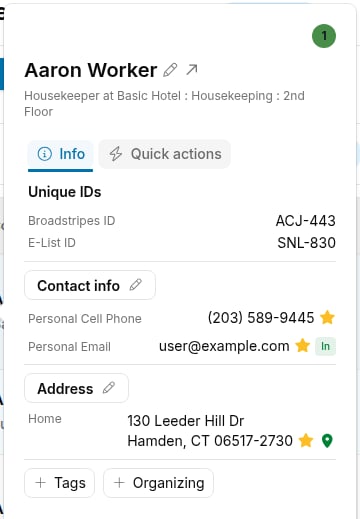
- The Quick view dialog has two tabs:
- The Info tab shows the person’s Broadstripes ID, phone numbers, email addresses, home address, and organizing information. If any of those sections are empty and you have permission to edit them, the panel shows add buttons at the bottom of the panel so you can open the editor for each empty section directly from the Quick view.
- The Quick actions tab provides shortcuts for common tasks like adding a timeline item, calling, sending an SMS, or jumping to the person’s record.